Перейти к основному содержанию
Присоединяйся к сообществу ремонтников - Создай аккаунт

Canon PowerShot SD1400 IS Screen Replacement

Выберете то, что вам нужно

  1. Canon PowerShot SD1400 IS Screen Replacement, Screen: шаг 1, изображение 1 из 3 Canon PowerShot SD1400 IS Screen Replacement, Screen: шаг 1, изображение 2 из 3 Canon PowerShot SD1400 IS Screen Replacement, Screen: шаг 1, изображение 3 из 3
    • Remove the 2.0 mm Phillips screws on both sides of the camera using the Phillips #00 screwdriver.

    • There will be 4 total screws that need to be removed, 2 on each side.

    Спросите у FixBot
  2. Canon PowerShot SD1400 IS Screen Replacement: шаг 2, изображение 1 из 1
    • Remove the 4.0 mm Phillips screw located on the bottom of the camera.

    Спросите у FixBot
  3. Canon PowerShot SD1400 IS Screen Replacement: шаг 3, изображение 1 из 1
    • Remove the front face panel of the camera.

    • The face can be removed by hand with a firm pressure. If one point of the face is stuck to the body, ensure that there is not a screw remaining at that position to hold it in place.

    Спросите у FixBot
  4. Canon PowerShot SD1400 IS Screen Replacement: шаг 4, изображение 1 из 1
    • Remove the rear panel of the camera.

    Спросите у FixBot
  5. Canon PowerShot SD1400 IS Screen Replacement: шаг 5, изображение 1 из 1
    • Remove the panel of buttons by hand.

    Спросите у FixBot
  6. Canon PowerShot SD1400 IS Screen Replacement: шаг 6, изображение 1 из 1
    • Remove the 3.0 mm Phillips copper colored screw from the top of the camera.

    Спросите у FixBot
  7. Canon PowerShot SD1400 IS Screen Replacement: шаг 7, изображение 1 из 1
    • Remove the 3.0 mm Phillips silver screw from the rear face of the camera, located on the upper right corner.

    Спросите у FixBot
  8. Canon PowerShot SD1400 IS Screen Replacement: шаг 8, изображение 1 из 1
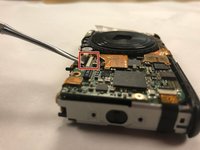
    • Using the plastic spudger, pry the golden film on the front face of the camera off of the microchip.

    • Once removed, a silver screw will be visible from underneath the golden film.

    Спросите у FixBot
  9. Canon PowerShot SD1400 IS Screen Replacement: шаг 9, изображение 1 из 1
    • Remove the 3.0 mm Phillips silver screw using the screwdriver.

    Спросите у FixBot
  10. Canon PowerShot SD1400 IS Screen Replacement: шаг 10, изображение 1 из 2 Canon PowerShot SD1400 IS Screen Replacement: шаг 10, изображение 2 из 2
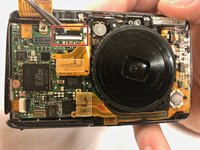
    • Using the metal spudger, carefully pry the small black tab away from the brown film end of the golden film.

    • Once released, the small black tab will point straight away from the front face of the camera.

    • After releasing the tab, the golden film will no longer be secured to the front face of the camera.

    Спросите у FixBot
  11. Canon PowerShot SD1400 IS Screen Replacement: шаг 11, изображение 1 из 1
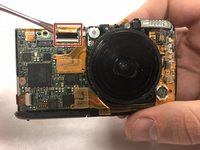
    • Unplug the small chip from the face of the camera by carefully inserting the metal spudger underneath the cluster of red wires visible. Then lift the cluster of wires upwards, parallel to the front face of the camera.

    Спросите у FixBot
  12. Canon PowerShot SD1400 IS Screen Replacement: шаг 12, изображение 1 из 1
    • You can now remove the top panel from the camera using your hands with firm pressure.

    Спросите у FixBot
  13. Canon PowerShot SD1400 IS Screen Replacement: шаг 13, изображение 1 из 2 Canon PowerShot SD1400 IS Screen Replacement: шаг 13, изображение 2 из 2
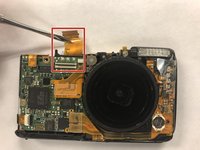
    • Insert the metal spudger underneath the golden film on the front face

    • Lift the golden film on the front face of the camera up and away from its connection

    Спросите у FixBot
  14. Canon PowerShot SD1400 IS Screen Replacement: шаг 14, изображение 1 из 1
    • Remove the screen by sliding the golden film out of the channel and pulling the screen away from the camera.

    Спросите у FixBot
Заключение

To reassemble your device, follow these instructions in reverse order.

4 человек успешно провели ремонт по этому руководству.

Braxton Beal

Участник с: 01/30/18

702 Репутация

Автор 3 руководств

Команда

Baylor, Team S1-G3, Johnson Spring 2018 Участник Baylor, Team S1-G3, Johnson Spring 2018

BU-JOHNSON-S18S1G3

3 членов

Автор 4 руководств

0 Комментарии к руководству

Добавить комментарий

Статистика просмотров:

За последние 24 часов: 2

За последние 7 дней: 9

За последние 30 дней: 68

За всё время: 1,282