Перейти к основному содержанию
Присоединяйся к сообществу ремонтников - Создай аккаунт

Canon PowerShot SD450 Flash Bulb

Выберете то, что вам нужно

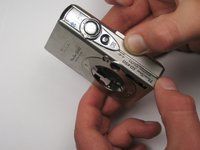
  1. Canon PowerShot SD450 Flash Bulb, Casing: шаг 1, изображение 1 из 1
    • Remove the battery and SD Card from their slots. Leaving these in could cause the battery to ground and ruin the electronics.

    • Unscrew the six screws on the casing. Two are on the bottom as pictured; two more are on each side of the camera.

    Спросите у FixBot

    Добавить комментарий

  2. Canon PowerShot SD450 Flash Bulb: шаг 2, изображение 1 из 1
    • Pull the lanyard mount off of the camera using a spudger or your fingers.

    Спросите у FixBot

    Добавить комментарий

  3. Canon PowerShot SD450 Flash Bulb: шаг 3, изображение 1 из 2 Canon PowerShot SD450 Flash Bulb: шаг 3, изображение 2 из 2
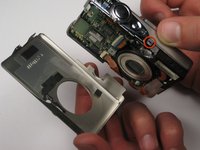
    • Find the line that separates the casing into its two halves. Hold each half separately, and gently pull apart.

    • Note that there is a small metal clip holding the two halves together. It might help to press down on the back half (indicated) while pulling upward slightly on the front half.

    Спросите у FixBot

    Добавить комментарий

  4. Canon PowerShot SD450 Flash Bulb: шаг 4, изображение 1 из 1
    • Take hold of the inside of the camera, and gently pull away from the back casing.

    Спросите у FixBot

    Добавить комментарий

  5. Canon PowerShot SD450 Flash Bulb: шаг 5, изображение 1 из 1
    • Remove the square, clear, rubber protector from the front of the logic board. This is not necessary to remove, but can easily fall off and get lost during later steps.

    Спросите у FixBot

    Добавить комментарий

  6. Canon PowerShot SD450 Flash Bulb: шаг 6, изображение 1 из 1
    • When you reassemble the camera, make sure the switch on the casing matches the position of the switch on the camera internals.

    • The black viewfinder padding can easily fall off the casing. Make sure you don't lose it when moving around parts.

    Спросите у FixBot

    Добавить комментарий

  7. Canon PowerShot SD450 Flash Bulb, Motherboard: шаг 7, изображение 1 из 1
    • Remove the LCD cable by gently prying the hinge open with a spudger or your finger. The cable should easily slide out.

    Спросите у FixBot

    Добавить комментарий

  8. Canon PowerShot SD450 Flash Bulb: шаг 8, изображение 1 из 1
    • Lift up the metallic-colored clip with the spudger to remove the shutter panel.

    Спросите у FixBot

    Добавить комментарий

  9. Canon PowerShot SD450 Flash Bulb: шаг 9, изображение 1 из 1
    • Remove the shutter panel with the spudger, now that the clip is released.

    Спросите у FixBot

    Добавить комментарий

  10. Canon PowerShot SD450 Flash Bulb: шаг 10, изображение 1 из 1
    • Use the spudger or your finger to release the orange ribbon from the logic board.

    Спросите у FixBot

    Добавить комментарий

  11. Canon PowerShot SD450 Flash Bulb: шаг 11, изображение 1 из 1
    • Pull the ribbon out of the socket using the spudger or your finger.

    • Disconnect the two other ribbons from the logic board in the same fashion.

    Спросите у FixBot

    Добавить комментарий

  12. Canon PowerShot SD450 Flash Bulb: шаг 12, изображение 1 из 1
    • Lift up the large green flap by using the spudger to pry up top right yellow edge.

    Спросите у FixBot

    Добавить комментарий

  13. Canon PowerShot SD450 Flash Bulb: шаг 13, изображение 1 из 1
    • Pull the flap back with the spudger so that the logic board is exposed.

    Спросите у FixBot

    Добавить комментарий

  14. Canon PowerShot SD450 Flash Bulb: шаг 14, изображение 1 из 1
    • Use the screwdriver to remove the three screws on the logic board. Take note that the bottom right screw is shorter than the other two.

    Спросите у FixBot

    Добавить комментарий

  15. Canon PowerShot SD450 Flash Bulb: шаг 15, изображение 1 из 1
    • Use the spudger to carefully remove the logic board from behind.

    Спросите у FixBot

    Добавить комментарий

  16. Canon PowerShot SD450 Flash Bulb: шаг 16, изображение 1 из 1
    • Remove the detached logic board from the camera.

    Спросите у FixBot

    Добавить комментарий

  17. Canon PowerShot SD450 Flash Bulb, Flash Bulb: шаг 17, изображение 1 из 1
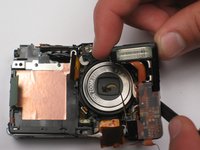
    • Remove the side screw holding the flash bulb.

    Спросите у FixBot

    Добавить комментарий

  18. Canon PowerShot SD450 Flash Bulb: шаг 18, изображение 1 из 1
    • Remove the orange ribbon from below the lens.

    Спросите у FixBot

    Добавить комментарий

  19. Canon PowerShot SD450 Flash Bulb: шаг 19, изображение 1 из 1
    Инструмент, используемый на этом этапе:
    Tweezers
    $4.99
    • Grasp the plug that yellow and black wires are attached to, and gently remove. Tweezers are very helpful here.

    Спросите у FixBot

    Добавить комментарий

  20. Canon PowerShot SD450 Flash Bulb: шаг 20, изображение 1 из 3 Canon PowerShot SD450 Flash Bulb: шаг 20, изображение 2 из 3 Canon PowerShot SD450 Flash Bulb: шаг 20, изображение 3 из 3
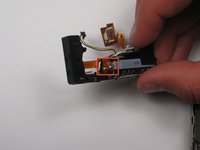
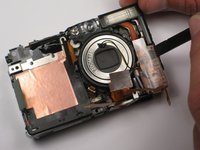
    • Note that there is a capacitor in the flash bulb assembly, under the small circuit board. Do not touch the two metal terminals, as the capacitor may discharge. Damage and personal injury may result.

    • Use the spudger to carefully lift the flash bulb out.

    Спросите у FixBot

    Добавить комментарий

Заключение

To reassemble your device, follow these instructions in reverse order.

Отменить: Я не выполнил это руководство.

Sean Whelan

Участник с: 04/12/10

19 Репутация

1 руководство автора

Команда

Cal Poly, Team 25-85, Amido Spring 2010 Участник Cal Poly, Team 25-85, Amido Spring 2010

CPSU-AMIDO-S10S25G85

4 членов

Автор 5 руководств

1 Комментарий к руководству

excellent a+!

Michelle - Ответить Поделиться

Добавить комментарий

Статистика просмотров:

За последние 24 часов: 0

За последние 7 дней: 4

За последние 30 дней: 39

За всё время: 4,619