Перейти к основному содержанию
Присоединяйся к сообществу ремонтников - Создай аккаунт

Cen-Tech Seven Function Digital Multimeter Screen Replacement

Выберете то, что вам нужно

    1. Cen-Tech Seven Function Digital Multimeter Screen Replacement, Position Device: шаг 1, изображение 1 из 1
      • Place the meter face down, and the back panel and screws can be seen.

      Спросите у FixBot

      Добавить комментарий

    2. Cen-Tech Seven Function Digital Multimeter Screen Replacement, Remove Back Panel Screws: шаг 2, изображение 1 из 2 Cen-Tech Seven Function Digital Multimeter Screen Replacement, Remove Back Panel Screws: шаг 2, изображение 2 из 2
      • Unscrew the two 9mm screws on the back panel using a #0 Phillips screwdriver.

      Спросите у FixBot

      Добавить комментарий

    3. Cen-Tech Seven Function Digital Multimeter Screen Replacement, Remove Back Panel: шаг 3, изображение 1 из 1
      • Remove the back panel of the device by lifting upward.

      • Remove the battery from the meter before continuing.

      Спросите у FixBot

      Добавить комментарий

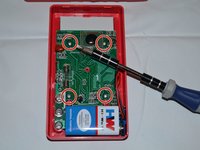
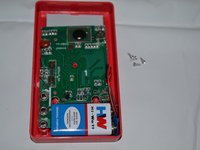
    4. Cen-Tech Seven Function Digital Multimeter Screen Replacement, Unscrew Motherboard: шаг 4, изображение 1 из 2 Cen-Tech Seven Function Digital Multimeter Screen Replacement, Unscrew Motherboard: шаг 4, изображение 2 из 2
      • Remove the four 7mm Phillips screws holding the circuit board in place.

      Спросите у FixBot

      Добавить комментарий

    5. Cen-Tech Seven Function Digital Multimeter Screen Replacement, Remove Motherboard: шаг 5, изображение 1 из 1
      • Gently lift the circuit board away from the device casing.

      • Remove the battery after removing the back cover to reduce the chances of short-circuiting the circuit board.

      Спросите у FixBot

      Добавить комментарий

    1. Cen-Tech Seven Function Digital Multimeter Screen Replacement, Locate Screen: шаг 6, изображение 1 из 1
      • The screen is located at the top of the device.

      Спросите у FixBot

      Добавить комментарий

    2. Cen-Tech Seven Function Digital Multimeter Screen Replacement, Remove Screen: шаг 7, изображение 1 из 1
      • Carefully remove screen from device by lifting upward.

      Спросите у FixBot

      Добавить комментарий

Заключение

To reassemble your device, follow these instructions in reverse order.

Отменить: Я не выполнил это руководство.

Anna Kihm

Участник с: 10/13/14

965 Репутация

Автор 5 руководств

Команда

Clemson, Team 2-4, Benson Fall 2014 Участник Clemson, Team 2-4, Benson Fall 2014

CLEM-BENSON-F14S2G4

4 членов

Автор 18 руководств

1 Комментарий к руководству

my multimeter display is broken, where can i buy a new one?

allwynrajkumar - Ответить Поделиться

Добавить комментарий

Статистика просмотров:

За последние 24 часов: 1

За последние 7 дней: 10

За последние 30 дней: 33

За всё время: 3,097