Перейти к основному содержанию
Присоединяйся к сообществу ремонтников - Создай аккаунт

Connect Four Electronic Handheld Back Casing Replacement

Выберете то, что вам нужно

  1. Connect Four Electronic Handheld Back Casing Replacement, Ensure the device is off.: шаг 1, изображение 1 из 1
    • Make sure the Connect Four Electronic Handheld is off by allowing it to shut off automatically.

    Спросите у FixBot

    Добавить комментарий

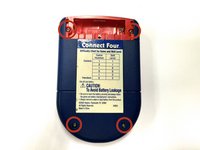
  2. Connect Four Electronic Handheld Back Casing Replacement, Removing the battery casing.: шаг 2, изображение 1 из 2 Connect Four Electronic Handheld Back Casing Replacement, Removing the battery casing.: шаг 2, изображение 2 из 2
    • Using a Phillips head screwdriver, remove the (9.1mm length) #2 screw in the middle of the battery casing.

    • Slide the cover off and remove the battery.

    Спросите у FixBot

    Добавить комментарий

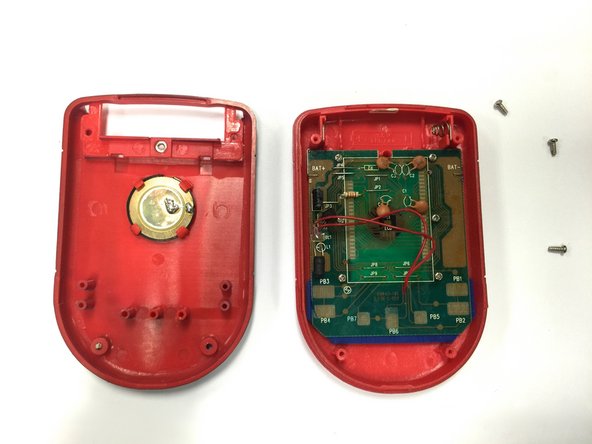
  3. Connect Four Electronic Handheld Back Casing Replacement, Removing/Replacing the Back Casing: шаг 3, изображение 1 из 2 Connect Four Electronic Handheld Back Casing Replacement, Removing/Replacing the Back Casing: шаг 3, изображение 2 из 2
    • Using a Phillips head screwdriver, remove the four (7.1mm- length) #3 screws that hold the back casing in place.

    • Carefully remove the back casing.

    • When removing the back casing, make sure not to rupture the wires that connect the speaker to the circuit board.

    Спросите у FixBot

    Добавить комментарий

Заключение

To reassemble your device, follow these instructions in reverse order.

Отменить: Я не выполнил это руководство.

Wil

Участник с: 10/22/14

313 Репутация

Автор 3 руководств

Команда

Baylor, Team 8-11, Williams Fall 2014 Участник Baylor, Team 8-11, Williams Fall 2014

BU-WILLIAMS-F14S8G11

3 членов

Автор 12 руководств

0 Комментарии к руководству

Добавить комментарий

Статистика просмотров:

За последние 24 часов: 0

За последние 7 дней: 9

За последние 30 дней: 47

За всё время: 413