Перейти к основному содержанию
Присоединяйся к сообществу ремонтников - Создай аккаунт

Dell AC511 Volume Knob Replacement

Выберете то, что вам нужно

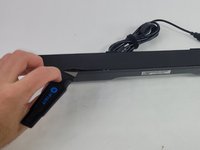
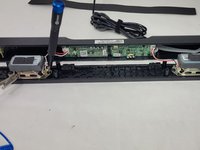
  1. Dell AC511 Volume Knob Replacement, Front Panel: шаг 1, изображение 1 из 3 Dell AC511 Volume Knob Replacement, Front Panel: шаг 1, изображение 2 из 3 Dell AC511 Volume Knob Replacement, Front Panel: шаг 1, изображение 3 из 3
    • Use a Jimmy to peel off the screen stuck to the front of the speaker.

    • Start from any corner and use the Jimmy to get under the screen. Once one side lifts up, you can use your fingers to peel the rest off.

    • Be careful to avoid damage to the rest of the speaker and especially to yourself.

    • Don't worry if it tears; use the Jimmy again to peel off the rest.

    Спросите у FixBot
  2. Dell AC511 Volume Knob Replacement: шаг 2, изображение 1 из 2 Dell AC511 Volume Knob Replacement: шаг 2, изображение 2 из 2
    • Remove ten 6 mm screws using a Phillips #1 screwdriver.

    Спросите у FixBot
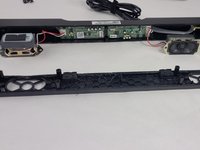
  3. Dell AC511 Volume Knob Replacement: шаг 3, изображение 1 из 2 Dell AC511 Volume Knob Replacement: шаг 3, изображение 2 из 2
    • Lift the front panel off of the rest of the device.

    • The speakers will still be attached to the front panel. Being too rough could damage them.

    • Remove the 4 mm screws from the speakers using a JIS #1 screwdriver.

    • Remove the front panel from the device.

    Спросите у FixBot
  4. Dell AC511 Volume Knob Replacement, Volume Knob: шаг 4, изображение 1 из 1
    • Apply a light downward pressure on the circuit board next to the volume control.

    • While doing, so carefully remove the clear piece of plastic connected to the side of the soundbar using the Halberd Spudger.

    Спросите у FixBot
  5. Dell AC511 Volume Knob Replacement: шаг 5, изображение 1 из 1
    • Grab the knob and rock it back and forth until you can get the Jimmy under it. Then, use the Jimmy to pull it out of the soundbar.

    • Remember to reinstall the clear piece of plastic attached to the LED when finished replacing the volume knob.

    Спросите у FixBot
Заключение

To reassemble your device, follow these instructions in reverse order.

William Cook

Участник с: 03/19/24

653 Репутация

Автор 6 руководств

Команда

UMass Dartmouth, Team 4-6, Shaddix Spring 2024 Участник UMass Dartmouth, Team 4-6, Shaddix Spring 2024

UMASSD-SHADDIX-S24S4G6

4 членов

Автор 6 руководств

0 Комментарии к руководству

Добавить комментарий

Статистика просмотров:

За последние 24 часов: 0

За последние 7 дней: 6

За последние 30 дней: 47

За всё время: 319