Введение
If your Dell Inspiron 1721 is not registering that certain keys are being pressed, or if you need access to other internal components, this guide will take you through the necessary steps to remove the keyboard.
Be sure the device is completely turned off before starting the removal process.
Выберете то, что вам нужно
-
-
-
Slide tabs outward to undo the locks.
-
Grab and pull the battery away from the device to remove.
 Спросите у FixBot
-
-
-
-
-
-
Pry up on the corner of the hinge cover with an iFixit opening tool.
-
Use the iFixit opening tool along both sides and the front of the hinge cover to release it.
-
Lean the display back as far as it goes and lift up on the hinge cover to remove.
-
-
-
-
-
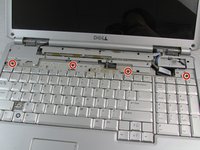
Remove four 3mm Phillips #1 screws from the top of the keyboard.
-
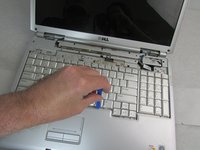
Use an iFixit opening tool to slide the keyboard upwards toward the display.
-
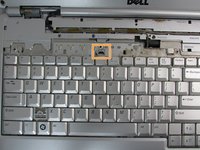
Slide the keyboard until it is clear of the lock tab, and lift it up to remove.
-
-


To reassemble your device, follow these instructions in reverse order.
Отменить: Я не выполнил это руководство.
2 человек успешно провели ремонт по этому руководству.

Команда

Embry-Riddle Aeronautical University, Team S8-G5, Salas Fall 2019 Участник Embry-Riddle Aeronautical University, Team S8-G5, Salas Fall 2019
ERAU-SALAS-F19S8G5
4 членов
Автор 81 руководств
