Этот перевод был сделан машиной и пока не проверен человеком. Говорите на этом языке? Просмотрите его.
Введение
В этом руководстве показано, как заменить оперативную память на ноутбуке Dell Inspiron 910.
Выберете то, что вам нужно
-
-
-
Переверните ноутбук аккумулятором вверх.
-
Сдвиньте фиксаторы аккумулятора к центру устройства.
-
Извлеките аккумулятор.
 Спросите у FixBot
-
-
-
-
-
Отсоедините все кабели и внешние устройства от ноутбука, затем переверните его и извлеките аккумулятор, нажав на фиксаторы аккумулятора внутрь.
-
-
-
-
Найдите большую черную панель, закрепленную двумя винтами. (Это панель с вентиляционными отверстиями)
-
Выкрутите оба винта с помощью крестовой отвертки.
-
-
-
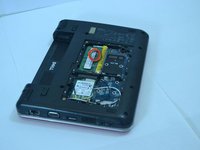
После снятия панели найдите модули памяти.
-
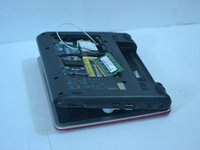
Найдите серебристые защелки по бокам белого пластикового держателя, удерживающего оперативную память. Затем аккуратно извлеките оперативную память.
-
-
-
Нажимайте на модуль оперативной памяти, пока он не зафиксируется на месте; при фиксации должен раздаться щелчок, а золотистые контакты должны быть едва видны.
-
-



Для обратной сборки устройства выполните эти инструкции в обратном порядке.
Отменить: Я не выполнил это руководство.
4 человек успешно провели ремонт по этому руководству.

Команду

Cal Poly, Team 14-10, Forte Spring 2012 Участник Cal Poly, Team 14-10, Forte Spring 2012
CPSU-FORTE-S12S14G10
5 членов
Автор 84 руководств
