Перейти к основному содержанию
Присоединяйся к сообществу ремонтников - Создай аккаунт

Dell Inspiron 9100 Optical Drive/Accessory Device Replacement

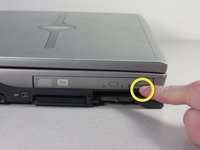
  1. Dell Inspiron 9100 Optical Drive/Accessory Device Replacement, Battery: шаг 1, изображение 1 из 3 Dell Inspiron 9100 Optical Drive/Accessory Device Replacement, Battery: шаг 1, изображение 2 из 3 Dell Inspiron 9100 Optical Drive/Accessory Device Replacement, Battery: шаг 1, изображение 3 из 3
    • Unplug the laptop from the power adapter and turn the power off.

    • Failure to unplug laptop before proceeding could result in risk of electric shock!

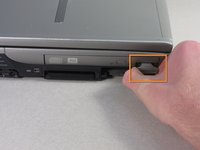
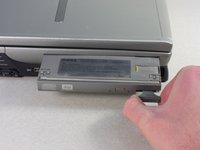
  2. Dell Inspiron 9100 Optical Drive/Accessory Device Replacement: шаг 2, изображение 1 из 3 Dell Inspiron 9100 Optical Drive/Accessory Device Replacement: шаг 2, изображение 2 из 3 Dell Inspiron 9100 Optical Drive/Accessory Device Replacement: шаг 2, изображение 3 из 3
    • Slide the battery-lock tab and hold.

    • Flip the battery away from the chassis to remove it.

  3. Dell Inspiron 9100 Optical Drive/Accessory Device Replacement, Optical Drive/Accessory Device: шаг 3, изображение 1 из 3 Dell Inspiron 9100 Optical Drive/Accessory Device Replacement, Optical Drive/Accessory Device: шаг 3, изображение 2 из 3 Dell Inspiron 9100 Optical Drive/Accessory Device Replacement, Optical Drive/Accessory Device: шаг 3, изображение 3 из 3
    • Press the tab on the outside face of the optical drive to release a handle.

    • Pull the handle to eject the optical drive unit from the slot, and slide it out.

Заключение

To reassemble your device, follow these instructions in reverse order.

charlierefvem

Участник с: 01/11/11

854 Репутация

Автор 7 руководств

Команда

Cal Poly, Team 13-2, Forte Winter 2011 Участник Cal Poly, Team 13-2, Forte Winter 2011

CPSU-FORTE-W11S13G2

5 членов

Автор 8 руководств

0 Комментарии к руководству

Добавить комментарий

Статистика просмотров:

За последние 24 часов: 1

За последние 7 дней: 11

За последние 30 дней: 22

За всё время: 2,347