Введение
We've all had a similar problem: The keyboard loses a key, something doesn't work with it, etc. While the Inspiron 9300 from Dell has aged, the durability and longevity of the device has still proven itself to old users and new users alike.
This quick guide will show you how to replace a faulty keyboard in the Dell Inspiron 9300.
Выберете то, что вам нужно
-
-
-
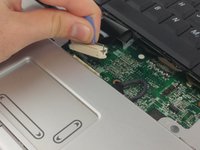
Use the spudger to remove the top cover plate to expose the screws for the keyboard.
 Спросите у FixBot
-
-
-
Remove the two 5mm Phillips screws holding the keyboard in place.
-
-
-
-
Gently pull up on the blue tab to disconnect the keyboard.
-
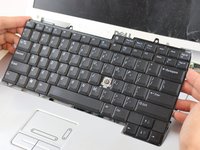
Pull the keyboard up and away to safely remove the keyboard.
-
-


To reassemble your device, follow these instructions in reverse order.
Отменить: Я не выполнил это руководство.
Еще один человек закончил это руководство.

Команда

USF Tampa, Team 16-6, Eyestone Fall 2016 Участник USF Tampa, Team 16-6, Eyestone Fall 2016
USFT-EYESTONE-F16S16G6
5 членов
Автор 11 руководств
