Введение
Upgrade or replace the ram in your Dell Inspiron 9300
Выберете то, что вам нужно
-
-
Инструмент, используемый на этом этапе:Anti-Static Wrist Strap$7.95
-
Flip the computer over and place it on a clean level surface.
-
Loosen the screws using a #0 Phillips screw driver.
 Спросите у FixBot
-
-
-
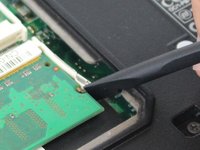
Инструмент, используемый на этом этапе:Heavy-Duty Spudger$4.99
-
Carefully pry away the retaining clips on either side of the ram modules using a spudger tool, until the card pops away from the motherboard.
-
-
-
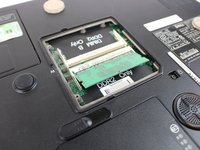
Carefully pull the ram modules out of it's slot, away from the motherboard.
-
-



Заключение
To reassemble your device, follow these instructions in reverse order.
Отменить: Я не выполнил это руководство.
Еще один человек закончил это руководство.


