Перейти к основному содержанию
Присоединяйся к сообществу ремонтников - Создай аккаунт

Dell Inspiron E1405 RAM Replacement

Выберете то, что вам нужно

    1. Dell Inspiron E1405 RAM Replacement, Battery: шаг 1, изображение 1 из 1
      • Save your work, power the laptop off, and ensure that the charging cable is unplugged before removing the battery.

      • Flip the laptop over.

      • Locate the battery release switch on the bottom of the laptop.

      Спросите у FixBot

      Добавить комментарий

    2. Dell Inspiron E1405 RAM Replacement: шаг 2, изображение 1 из 3 Dell Inspiron E1405 RAM Replacement: шаг 2, изображение 2 из 3 Dell Inspiron E1405 RAM Replacement: шаг 2, изображение 3 из 3
      • Slide the battery release switch away from the lock symbol until you hear the battery click.

      • Slide the battery towards the back of the laptop until it comes free.

      Спросите у FixBot

      Добавить комментарий

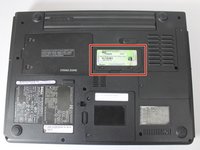
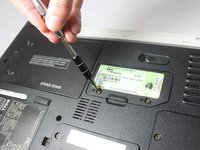
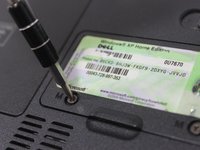
    1. Dell Inspiron E1405 RAM Replacement, RAM: шаг 3, изображение 1 из 3 Dell Inspiron E1405 RAM Replacement, RAM: шаг 3, изображение 2 из 3 Dell Inspiron E1405 RAM Replacement, RAM: шаг 3, изображение 3 из 3
      • Locate the RAM access door.

      • Remove the two 5.5mm screws securing the RAM access door with a #00 Phillips screwdriver.

      Спросите у FixBot

      Добавить комментарий

    2. Dell Inspiron E1405 RAM Replacement: шаг 4, изображение 1 из 1
      • Using your fingers, open and remove the access door from the laptop, exposing the RAM underneath.

      Спросите у FixBot

      Добавить комментарий

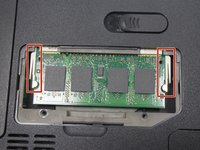
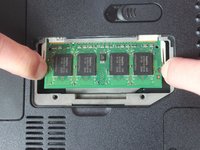
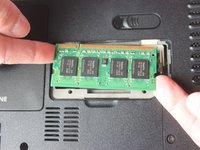
    3. Dell Inspiron E1405 RAM Replacement: шаг 5, изображение 1 из 3 Dell Inspiron E1405 RAM Replacement: шаг 5, изображение 2 из 3 Dell Inspiron E1405 RAM Replacement: шаг 5, изображение 3 из 3
      • To access the RAM, push out the latches outward on the left and right of the RAM.

      • To remove the memory card, pull it out of the tray with the latches still stretched out.

      Спросите у FixBot

      Добавить комментарий

Заключение

To reassemble your device, follow these instructions in reverse order.

Отменить: Я не выполнил это руководство.

Еще один человек закончил это руководство.

Sarah Neal Secrest

Участник с: 03/20/17

597 Репутация

Автор 5 руководств

Команда

Texas Tech, Team S8-G3, Bennett Spring 2017 Участник Texas Tech, Team S8-G3, Bennett Spring 2017

TTU-BENNETT-S17S8G3

3 членов

Автор 25 руководств

0 Комментарии к руководству

Добавить комментарий

Статистика просмотров:

За последние 24 часов: 0

За последние 7 дней: 3

За последние 30 дней: 24

За всё время: 833