Перейти к основному содержанию
Присоединяйся к сообществу ремонтников - Создай аккаунт

Dell Vostro 1014 Memory Module Replacement

Выберете то, что вам нужно

  1. Dell Vostro 1014 Memory Module Replacement, Battery: шаг 1, изображение 1 из 2 Dell Vostro 1014 Memory Module Replacement, Battery: шаг 1, изображение 2 из 2
    • Slide the battery latches apart to the unlock position.

    • Lift the battery from the computer.

  2. Dell Vostro 1014 Memory Module Replacement, Access Panel: шаг 2, изображение 1 из 2 Dell Vostro 1014 Memory Module Replacement, Access Panel: шаг 2, изображение 2 из 2
    • Remove the six screws that secure the access panel to the computer.

    • Remove the access panel from the computer.

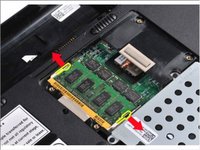
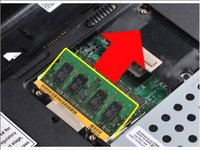
  3. Dell Vostro 1014 Memory Module Replacement, Memory Module: шаг 3, изображение 1 из 2 Dell Vostro 1014 Memory Module Replacement, Memory Module: шаг 3, изображение 2 из 2
    • Use your fingertips to carefully spread apart the securing clips on each end of the memory module connector until the module pops up.

    • Slide the memory module from its socket and remove the module from the computer.

Заключение

To reassemble your device, follow these instructions in reverse order.

Johnathan Hammond

Участник с: 02/28/18

46 149 Репутация

Автор 408 руководств

Команда

RampUP America, Inc. Участник RampUP America, Inc.

Community

45 членов

Автор 2 002 руководств

0 Комментарии к руководству

Добавить комментарий

Статистика просмотров:

За последние 24 часов: 3

За последние 7 дней: 12

За последние 30 дней: 39

За всё время: 313