Перейти к основному содержанию
Присоединяйся к сообществу ремонтников - Создай аккаунт

Dell XPS M1530 RAM Replacement

Выберете то, что вам нужно

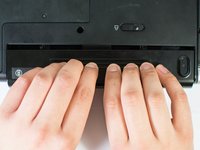
    1. Dell XPS M1530 RAM Replacement, Battery: шаг 1, изображение 1 из 1
      • Turn the computer upside down with the battery facing you.

      • Turn the computer off and disconnect the charging cable from the computer.

      • Failure to unplug the charging cable may result in electric shock.

      Спросите у FixBot

      Добавить комментарий

    2. Dell XPS M1530 RAM Replacement: шаг 2, изображение 1 из 1
      • Push the switch as far to the right as possible to unlock the battery.

      Спросите у FixBot

      Добавить комментарий

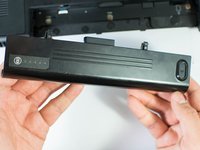
    3. Dell XPS M1530 RAM Replacement: шаг 3, изображение 1 из 2 Dell XPS M1530 RAM Replacement: шаг 3, изображение 2 из 2
      • Remove the battery using two hands and pull it away from the computer.

      Спросите у FixBot

      Добавить комментарий

    1. Dell XPS M1530 RAM Replacement, RAM: шаг 4, изображение 1 из 1
      • Unscrew the four Phillips #1 screws holding down the back panel. Then remove one 5.8mm Phillips #1 screw labeled "M" in the middle of the back panel.

      • Four 3.9mm Phillips #1 screws

      • One 5.8mm Phillips #1 screw

      Спросите у FixBot

      Добавить комментарий

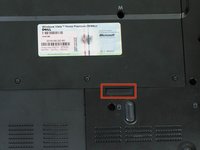
    2. Dell XPS M1530 RAM Replacement: шаг 5, изображение 1 из 2 Dell XPS M1530 RAM Replacement: шаг 5, изображение 2 из 2
      • Using the highlighted indent, pull up and out to remove the back panel.

      • The indent should provide enough grip to remove the panel with ease.

      Спросите у FixBot

      Добавить комментарий

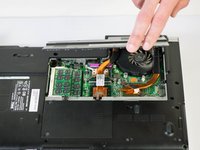
    3. Dell XPS M1530 RAM Replacement: шаг 6, изображение 1 из 2 Dell XPS M1530 RAM Replacement: шаг 6, изображение 2 из 2
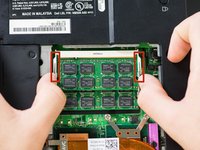
      • Push out on the first set of metal tabs to release and remove the top RAM chip.

      Спросите у FixBot

      Добавить комментарий

    4. Dell XPS M1530 RAM Replacement: шаг 7, изображение 1 из 3 Dell XPS M1530 RAM Replacement: шаг 7, изображение 2 из 3 Dell XPS M1530 RAM Replacement: шаг 7, изображение 3 из 3
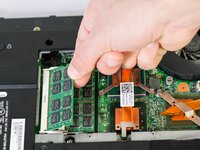
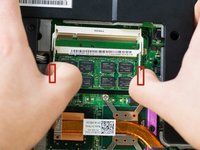
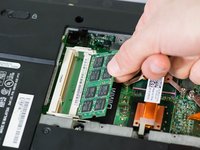
      • Push out on the second set of metal tabs to release and remove the lower RAM chip.

      Спросите у FixBot

      Добавить комментарий

Заключение

To reassemble your device, follow these instructions in reverse order.

Отменить: Я не выполнил это руководство.

3 человек успешно провели ремонт по этому руководству.

Jase Sasaki

Участник с: 01/22/15

721 Репутация

Автор 5 руководств

Команда

Cal Poly, Team 18-4, Maness Winter 2015 Участник Cal Poly, Team 18-4, Maness Winter 2015

CPSU-MANESS-W15S18G4

4 членов

Автор 8 руководств

0 Комментарии к руководству

Добавить комментарий

Статистика просмотров:

За последние 24 часов: 0

За последние 7 дней: 7

За последние 30 дней: 35

За всё время: 1,248