Введение
A computer graphics card allows a computer to plug into a monitor and be displayed. Graphics cards are vital components for computers. Also, replacing a graphics card can help your computer run more quickly and smoothly.
Выберете то, что вам нужно
-
-
Remove the two Phillips #2 head 5mm screws from the back side of the computer case. You only need to remove the screws that hold down the panel.
 Спросите у FixBot
-
-
-
Next, remove the side panel of the computer case to allow access into the computer. Slide the panel towards the back of the computer and lift it up to remove.
-
-
-
-
Remove the Phillips #2 head, 5mm screw holding the graphics card in place.
-
-
-
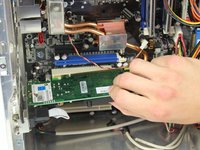
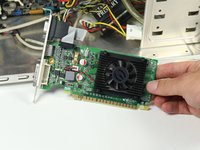
Press the latch on the side of the connector area to unlock the graphics card, and carefully slide the graphics card out from its slot in the computer.
-
A good technique is to lay the computer onto it side, push the latch down and lift the graphics card out.
-


To reassemble your device, follow these instructions in reverse order.
Отменить: Я не выполнил это руководство.
86 человек успешно провели ремонт по этому руководству.

Команда

Cal Poly, Team 4-5, Maness Spring 2015 Участник Cal Poly, Team 4-5, Maness Spring 2015
CPSU-MANESS-S15S4G5
4 членов
Автор 49 руководств
3 Комментарии к руководству
There should be a notice about the PCI-E slot, which has a security latch; the latch should be pressed in order to remove the graphics card from the motherboard.
I have a all in one pc so this is not relevant
any diffrerences in slots?
