Перейти к основному содержанию
Присоединяйся к сообществу ремонтников - Создай аккаунт

Disassembling IBM ThinkPad A30 Floppy Disk Drive

  1. Disassembling IBM ThinkPad A30 Floppy Disk Drive, Battery: шаг 1, изображение 1 из 2 Disassembling IBM ThinkPad A30 Floppy Disk Drive, Battery: шаг 1, изображение 2 из 2
    • Flip the ThinkPad over so that it is upside down.

    • Slide the highlighted tab to the left.

    • With your finger on the tab, remove the battery by lifting it upwards away from the laptop.

    Спросите у FixBot

    Добавить комментарий

  2. Disassembling IBM ThinkPad A30 Floppy Disk Drive, Floppy Disk Drive: шаг 2, изображение 1 из 2 Disassembling IBM ThinkPad A30 Floppy Disk Drive, Floppy Disk Drive: шаг 2, изображение 2 из 2
    • Hold the Thinkpad as the picture shows.

    • There is a switch located just above and to the right of the drive.

    • Slide the switch to the right. A small, black tab will pop out.

    Спросите у FixBot

    Добавить комментарий

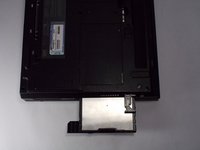
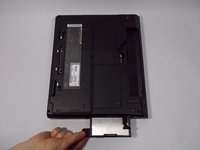
  3. Disassembling IBM ThinkPad A30 Floppy Disk Drive: шаг 3, изображение 1 из 2 Disassembling IBM ThinkPad A30 Floppy Disk Drive: шаг 3, изображение 2 из 2
    • Pull the small black tab away from the computer to access the drive.

    • Gently pull the drive out from the laptop.

    • If there is a problem with your tab, whether it doesn't pop out or it doesn't expose the floppy drive, please check the corresponding entry in the troubleshooting page.

    Спросите у FixBot

    Добавить комментарий

Заключение

To reassemble, place the floppy disk drive back into its bay the way it was facing before

Отменить: Я не выполнил это руководство.

Jessica

Участник с: 10/06/10

162 Репутация

Автор 7 руководств

Команда

Cal Poly, Team 4-44, Amido Fall 2010 Участник Cal Poly, Team 4-44, Amido Fall 2010

CPSU-AMIDO-F10S4G44

4 членов

Автор 26 руководств

0 Комментарии к руководству

Добавить комментарий

Статистика просмотров:

За последние 24 часов: 3

За последние 7 дней: 19

За последние 30 дней: 68

За всё время: 3,175