Перейти к основному содержанию
Присоединяйся к сообществу ремонтников - Создай аккаунт

Dremel 4000 Power Cord Replacement

Выберете то, что вам нужно

    1. Dremel 4000 Power Cord Replacement, Back Case: шаг 1, изображение 1 из 2 Dremel 4000 Power Cord Replacement, Back Case: шаг 1, изображение 2 из 2
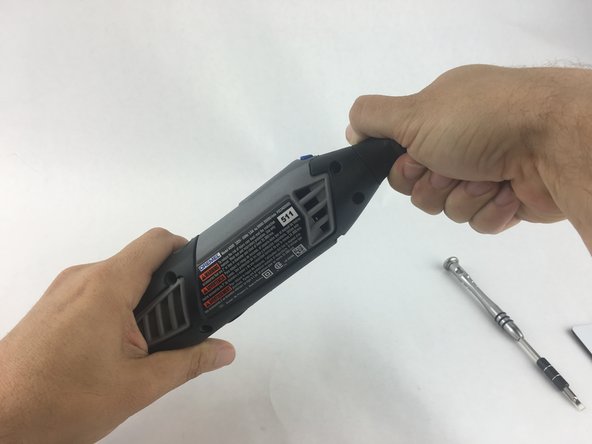
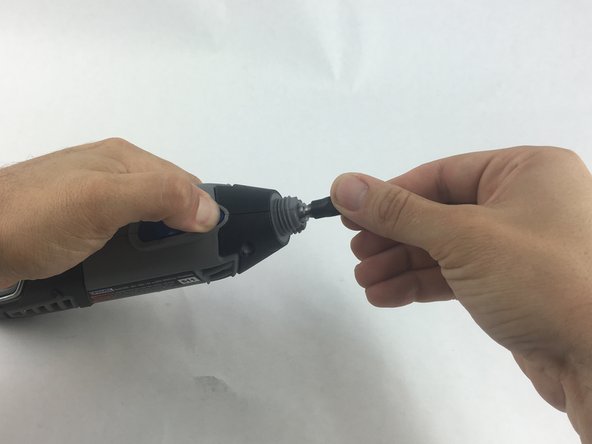
      • Start by removing the housing cap by unscrewing it.

      • Next, unscrew the now exposed collet nut while holding down the shaft lock button.

      • To remove the collet nut, you may need to use the small open-end wrench provided with the Dremel.

      Спросите у FixBot

      Добавить комментарий

    2. Dremel 4000 Power Cord Replacement: шаг 2, изображение 1 из 1
      • Using your hands, carefully remove hanger from casing.

      Спросите у FixBot

      Добавить комментарий

    3. Dremel 4000 Power Cord Replacement: шаг 3, изображение 1 из 2 Dremel 4000 Power Cord Replacement: шаг 3, изображение 2 из 2
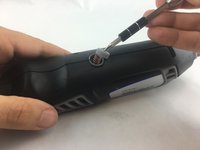
      • Remove the brush caps (one on each side) by using a flathead screwdriver bit.

      • The brush caps are spring loaded.

      Спросите у FixBot

      Добавить комментарий

    4. Dremel 4000 Power Cord Replacement: шаг 4, изображение 1 из 1
      • Using the Torx 15 screwdriver tip, remove the 5 screws (12.5 mm) that hold the casing together.

      Спросите у FixBot

      Добавить комментарий

    5. Dremel 4000 Power Cord Replacement: шаг 5, изображение 1 из 1
      • Use a plastic opening tool to gently wedge apart the hard plastic threads.

      Спросите у FixBot

      Добавить комментарий

    6. Dremel 4000 Power Cord Replacement: шаг 6, изображение 1 из 1
      • Use your hands to carefully remove the back casing so that none of the components fall out.

      Спросите у FixBot

      Добавить комментарий

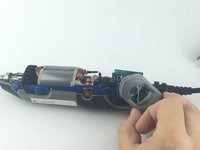
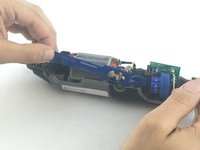
    1. Dremel 4000 Power Cord Replacement, Power Cord: шаг 7, изображение 1 из 2 Dremel 4000 Power Cord Replacement, Power Cord: шаг 7, изображение 2 из 2
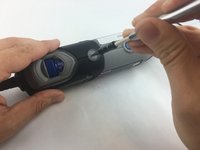
      • To clear access to the electrical assembly, remove the variable speed dial cap and blue power lever, and set them aside.

      Спросите у FixBot

      Добавить комментарий

    2. Dremel 4000 Power Cord Replacement: шаг 8, изображение 1 из 1
      • Using your fingers, carefully pull the circuit board from the casing. This will make it easier to remove the power cord.

      Спросите у FixBot

      Добавить комментарий

    3. Dremel 4000 Power Cord Replacement: шаг 9, изображение 1 из 1
      • Each wire is fed through a small opening on the circuit board and held with a flat head screw.

      • Loosen the screw just enough to remove the wire by gently pulling it with your hand.

      Спросите у FixBot

      Добавить комментарий

    4. Dremel 4000 Power Cord Replacement: шаг 10, изображение 1 из 1
      • Carefully remove both wires from circuit board with your hands.

      • Take careful note of which side has the black wire and which has the white wire.

      Спросите у FixBot

      Добавить комментарий

Заключение

To reassemble your device, follow these instructions in reverse order.

Отменить: Я не выполнил это руководство.

5 человек успешно провели ремонт по этому руководству.

John Cobb

Участник с: 01/20/16

1 842 Репутация

Автор 4 руководств

Команда

USF Tampa, Team 15-4, Remmell Spring 2016 Участник USF Tampa, Team 15-4, Remmell Spring 2016

USFT-REMMELL-S16S15G4

4 членов

Автор 40 руководств

1 Комментарий к руководству

Super handy guide after my guide dog decided to chew through the cable!

Geoff Palmer - Ответить Поделиться

Добавить комментарий

Статистика просмотров:

За последние 24 часов: 2

За последние 7 дней: 18

За последние 30 дней: 85

За всё время: 7,596