Перейти к основному содержанию
Присоединяйся к сообществу ремонтников - Создай аккаунт

Ematic Genesis Speaker Replacement

Выберете то, что вам нужно

  1. Ematic Genesis Speaker Replacement, Ematic Genesis Casing: шаг 1, изображение 1 из 3 Ematic Genesis Speaker Replacement, Ematic Genesis Casing: шаг 1, изображение 2 из 3 Ematic Genesis Speaker Replacement, Ematic Genesis Casing: шаг 1, изображение 3 из 3
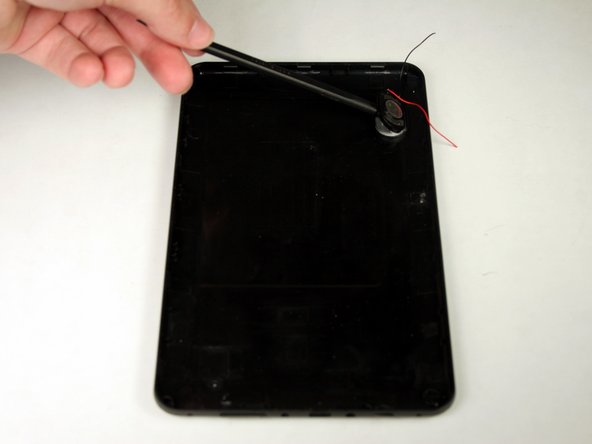
    • Unscrew the two (2) 1.3mm Phillips #00 screws found on the bottom edge of the tablet, where the power and volume buttons are located.

    Спросите у FixBot

    Добавить комментарий

  2. Ematic Genesis Speaker Replacement: шаг 2, изображение 1 из 3 Ematic Genesis Speaker Replacement: шаг 2, изображение 2 из 3 Ematic Genesis Speaker Replacement: шаг 2, изображение 3 из 3
    • Insert plastic opening tool into the edge between the screen plate and the back plate to create a separation between the casings.

    • Insert the flat end of the spudger next to the plastic opening tool and carefully pry the edges apart. Continue this all around the edges until the casings separate.

    • There may be cracking sounds when prying them apart. If carefully done, this is only the locks coming apart and is not harmful.

    • Be careful when separating the two plates as they are connected by the speaker wires and could be disconnected during this process.

    Спросите у FixBot

    Добавить комментарий

  3. Ematic Genesis Speaker Replacement: шаг 3, изображение 1 из 1
    • Remove back plate from screen plate and lay both down flat next to each other.

    • Be careful when separating the two plates as they are connected by the speaker wires and could be disconnected during this process.

    Спросите у FixBot

    Добавить комментарий

  4. Ematic Genesis Speaker Replacement, Speaker: шаг 4, изображение 1 из 1
    • Once panels are separated, disconnect speaker wires from motherboard.

    • Make sure device is completely turned off before doing this to avoid a potential electric shock.

    Спросите у FixBot

    Добавить комментарий

  5. Ematic Genesis Speaker Replacement: шаг 5, изображение 1 из 2 Ematic Genesis Speaker Replacement: шаг 5, изображение 2 из 2
    • Insert the flat end of the spudger between the casing and the speaker. Push inwards to pry the speaker from the casing.

    Спросите у FixBot

    Добавить комментарий

Заключение

To reassemble your device, follow these instructions in reverse order.

Отменить: Я не выполнил это руководство.

Justin Rohrman

Участник с: 03/23/15

745 Репутация

Автор 6 руководств

Команда

Baylor, Team 4-3, Williams Spring 2015 Участник Baylor, Team 4-3, Williams Spring 2015

BU-WILLIAMS-S15S4G3

3 членов

Автор 12 руководств

1 Комментарий к руководству

This help us alot, thanks for posting troubleshooting

wikirichard - Ответить Поделиться

Добавить комментарий

Статистика просмотров:

За последние 24 часов: 0

За последние 7 дней: 6

За последние 30 дней: 45

За всё время: 415