Перейти к основному содержанию
Присоединяйся к сообществу ремонтников - Создай аккаунт

Evercade EXP Power Button Replacement

Выберете то, что вам нужно

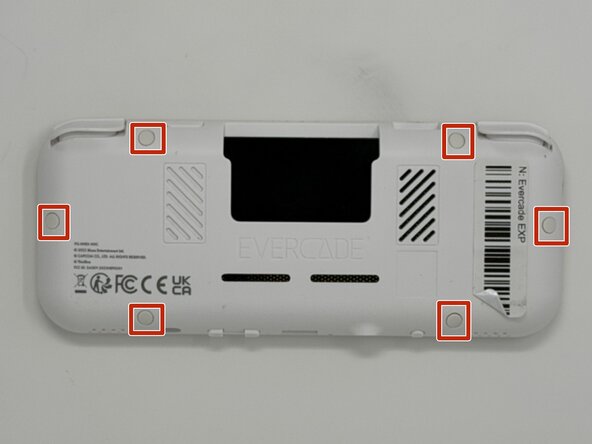
  1. Evercade EXP Power Button Replacement, Faceplate: шаг 1, изображение 1 из 3 Evercade EXP Power Button Replacement, Faceplate: шаг 1, изображение 2 из 3 Evercade EXP Power Button Replacement, Faceplate: шаг 1, изображение 3 из 3
    • Lay the device on a flat surface, with the screen facing the sufrace.

    • Using angled tweezers, remove the six rubber screw covers from the sockets.

    • The covers are all identical, so they do not need to be stored separately from one another.

    Спросите у FixBot

    Добавить комментарий

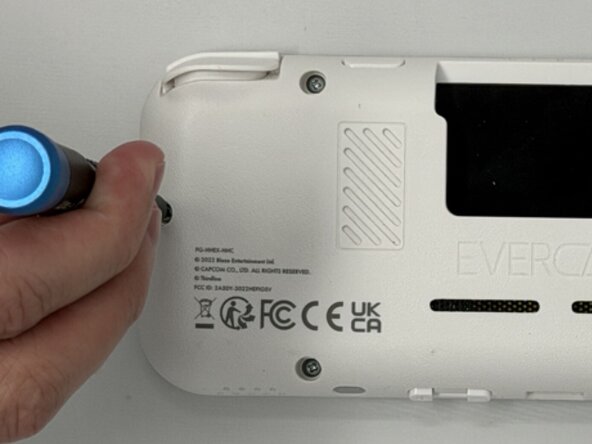
  2. Evercade EXP Power Button Replacement: шаг 2, изображение 1 из 3 Evercade EXP Power Button Replacement: шаг 2, изображение 2 из 3 Evercade EXP Power Button Replacement: шаг 2, изображение 3 из 3
    • Using a Phillips #00 screwdriver, remove the six 8 mm screws on the lower case.

    Спросите у FixBot

    Добавить комментарий

  3. Evercade EXP Power Button Replacement: шаг 3, изображение 1 из 2 Evercade EXP Power Button Replacement: шаг 3, изображение 2 из 2
    • Flip the device so the screen is facing you.

    • Four hidden retaining clips hold the pieces together even near each corner of the screen.

    • Insert a Jimmy into the seam located between the faceplate and the shell.

    • Move the a Jimmy toward the screen until you find the first clasp. Move the handle of the jimmy tool up to pop the faceplate free from the clasp.

    • Repeat until for each of the four clasps to fully release the faceplate from the shell.

    • Do not use excessive force when moving the Jimmy. The plastic may shear if too much force is applied horizontally, and it may snap if too much vertical force is applied.

    Спросите у FixBot

    Добавить комментарий

  4. Evercade EXP Power Button Replacement: шаг 4, изображение 1 из 3 Evercade EXP Power Button Replacement: шаг 4, изображение 2 из 3 Evercade EXP Power Button Replacement: шаг 4, изображение 3 из 3
    • Flip the faceplate away from the shell carefully. The faceplate is still connected to the motherboard via a ribbon cable.

    • Flip up the locking flap securing the display ribbon cable, then use tweezers to disconnect the ribbon cable.

    • Be careful when separating the faceplate from the shell, the buttons are held in place by the connection, so they may fall out when opening the device.

    Спросите у FixBot

    Добавить комментарий

  5. Evercade EXP Power Button Replacement, Motherboard: шаг 5, изображение 1 из 3 Evercade EXP Power Button Replacement, Motherboard: шаг 5, изображение 2 из 3 Evercade EXP Power Button Replacement, Motherboard: шаг 5, изображение 3 из 3
    • Use a Phillips #00 screwdriver to remove all ten 8 mm screws securing the motherboard.

    Спросите у FixBot

    Добавить комментарий

  6. Evercade EXP Power Button Replacement: шаг 6, изображение 1 из 1
    • Using angled tweezers, gently lift both speakers from the cavities they rest in.

    • Don't attempt to fully remove the speakers from the motherboard. They're still secured with soldered connections.

    • The speakers are held in place by a weak adhesive. Apply force when removing speakers. Be careful not to damage the surrounding frame and speakers.

    Спросите у FixBot

    Добавить комментарий

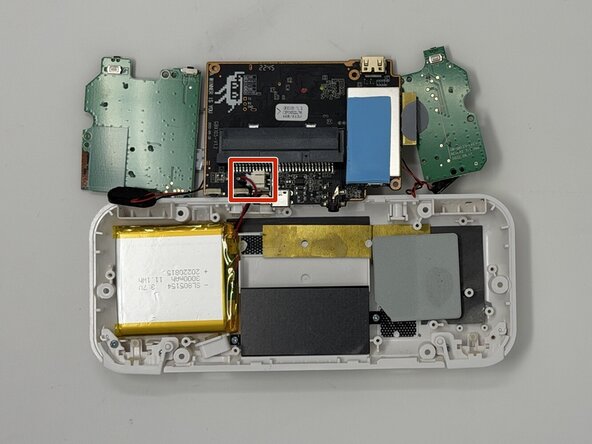
  7. Evercade EXP Power Button Replacement: шаг 7, изображение 1 из 3 Evercade EXP Power Button Replacement: шаг 7, изображение 2 из 3 Evercade EXP Power Button Replacement: шаг 7, изображение 3 из 3
    • The battery is wired to the motherboard via a connector inserted into a socket.

    • Flip the motherboard to the outside of the console.

    • The side boards are connected to the center board by a ribbon cable and a soldered wire, when removing the entire motherboard, keep them connected.

    • Remove the connector from the socket attached to the motherboard. The piece is held in place near the back of the socket. Apply downward pressure while pulling out to make the removal easier.

    • When removing the connector, it may require a significant amount of force. If too much force is applied, the plastic connector may compress or snap.

    Спросите у FixBot

    Добавить комментарий

  8. Evercade EXP Power Button Replacement, Battery: шаг 8, изображение 1 из 3 Evercade EXP Power Button Replacement, Battery: шаг 8, изображение 2 из 3 Evercade EXP Power Button Replacement, Battery: шаг 8, изображение 3 из 3
    • The battery is connected to the case with a strong adhesive. To remove the battery, you will need to use a heat source to loosen then adhesive.

    • Use a hair dryer or a heat gun on low to apply heat to the back of the case while gently prying the battery out with an opening tool.

    • Take care not to bend, warp, twist, or puncture the battery during removal. Avoid using tweezers or metal pry tools to remove batteries unless absolutely necessary. Metal tools can easily puncture batteries and cause the release of noxious chemicals or even start a fire.

    • Set the battery aside for recycling.

    Спросите у FixBot

    Добавить комментарий

  9. Evercade EXP Power Button Replacement, Power Button: шаг 9, изображение 1 из 3 Evercade EXP Power Button Replacement, Power Button: шаг 9, изображение 2 из 3 Evercade EXP Power Button Replacement, Power Button: шаг 9, изображение 3 из 3
    • The power button is a rectangular plastic piece with rounded edges located on the top edge of the device near the right corner.

    • Remove the plastic piece from the shell with a pair of tweezers from the inside.

    Спросите у FixBot

    Добавить комментарий

Заключение

To reassemble your device, follow these instructions in reverse order.

Отменить: Я не выполнил это руководство.

Michael Williams

Участник с: 02/03/26

356 Репутация

Автор 3 руководств

Команда

Utah Tech University, Team 1-6, McMurrin Spring 2026 Участник Utah Tech University, Team 1-6, McMurrin Spring 2026

UTAHTECH-MCMURRIN-S26S1G6

3 членов

Автор 7 руководств

0 Комментарии к руководству

Добавить комментарий

Статистика просмотров:

За последние 24 часов: 2

За последние 7 дней: 12

За последние 30 дней: 25

За всё время: 62