Перейти к основному содержанию
Присоединяйся к сообществу ремонтников - Создай аккаунт

Fan Replacement

Выберете то, что вам нужно

  1. Fan Replacement, Battery: шаг 1, изображение 1 из 3 Fan Replacement, Battery: шаг 1, изображение 2 из 3 Fan Replacement, Battery: шаг 1, изображение 3 из 3
    • Unlock the battery latch on the right.

    • Unlock the battery lock on the left.

    • Remove the battery pack from its slot.

  2. Fan Replacement, Access to Components 2: шаг 2, изображение 1 из 3 Fan Replacement, Access to Components 2: шаг 2, изображение 2 из 3 Fan Replacement, Access to Components 2: шаг 2, изображение 3 из 3
    • Using the Philips # 0 screwdriver, unscrew the 2 screws of the top cover

    • Check the marks indicating the direction in which the cover must be removed.

    • Remove the bottom cover by removing it in the direction of the markers.

  3. Fan Replacement: шаг 3, изображение 1 из 1
    • Then appear the other components of the Laptop.

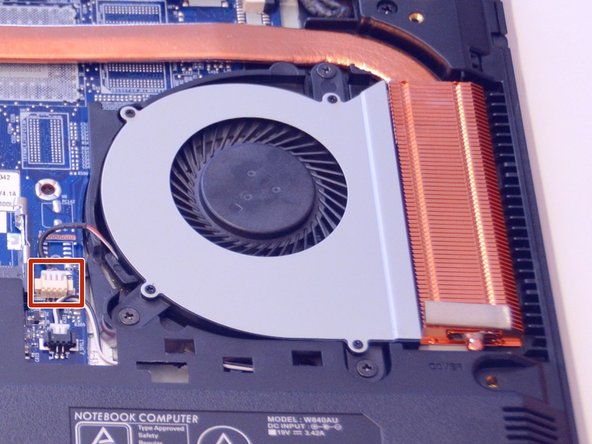
  4. Fan Replacement, Fan: шаг 4, изображение 1 из 3 Fan Replacement, Fan: шаг 4, изображение 2 из 3 Fan Replacement, Fan: шаг 4, изображение 3 из 3
    • Here is the fan.

    • Disconnect the power cable from this one.

    • Unscrew the screws that hold it in place.

  5. Fan Replacement: шаг 5, изображение 1 из 1
    • Gently lift the fan out of its slot.

Заключение

To reassemble your device follow the following instructions in reverse order

Особая благодарность этим переводчикам:

fr en

100%

irlanda помогает нам починить мир! Хотите внести свой вклад?
Начните переводить ›

Felice Suglia

Участник с: 06/15/13

33 538 Репутация

Автор 283 руководств

0 Комментарии к руководству

Добавить комментарий

Статистика просмотров:

За последние 24 часов: 3

За последние 7 дней: 10

За последние 30 дней: 34

За всё время: 1,364