Введение
This guide shows how to replace the main power cord in the Fellowes T7CM.
Выберете то, что вам нужно
-
-
-
Check to make sure the shredder is not plugged in to any electrical outlet.
-
Remove the shredder from the catch basket and place the silver side down on a flat surface.
-
Place the catch basket aside as you will not be needing it for the rest of the disassembly.
 Спросите у FixBot
-
-
-
Flip the shredder silver side down and place on a flat even surface.
-
Remove the manufacturer's label in order to gain access to the hidden screw hole.
-
Locate all five of the case screws and remove them with a Phillips-Head screwdriver. The screws are located within the five marked circles in the photo. The size of the screws are 18 mm in length and head diameter of 5 mm.
-
-
-
Once all of the screws are removed, slowly pull apart the casing.
-
If the casing is not separating, gently wiggle the top part of the casing from the bottom part of the casing.
-
-
-
-
Open the casing as shown to prevent tangling or damaging the wires.
-
Take note to how the trigger assembly is attached before removal.
-
The trigger assembly is one part and should come off all together with little to no force applied.
-
Remove the trigger assembly.
-
-
-
-
-
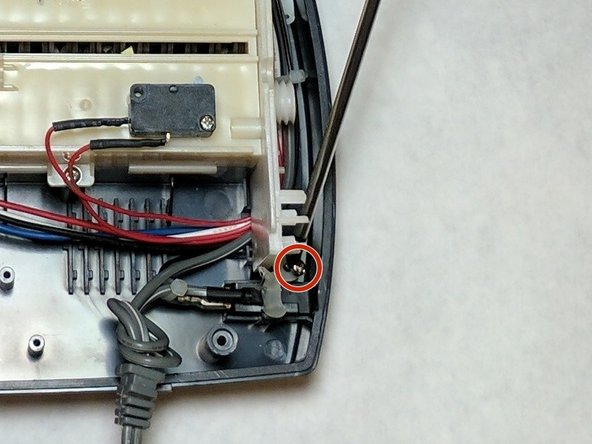
Remove the wire holder. This is a small screwed in piece of plastic which holds the wires in place. The screw length is 10 mm and the head diameter is 6 mm.
-
-
-
Remove the blade housing from the external case.
-
Remove the three screws from the blade housing. The screw length is 18 mm and the head diameter is 5 mm
-
-
-
Use Caution when lifting the blade housing from the casing.
-
Warning: Sharp Objects are now exposed.
-
Place the blade housing close to the case to ensure no damage occurs to the connected wires and that they remained attached to the casing.
-
-
-
Locate the main power cord.
-
Clip the wire and strip the remaining end of the wire. Twist the new cord together with the remaining old wire.
-
Use electrical tape in order to cover the wire splice.
-
-




To reassemble your device, follow these instructions in reverse order.
Отменить: Я не выполнил это руководство.
Еще один человек закончил это руководство.

Команда

IUPUI, Team 2-2, Baechle Fall 2016 Участник IUPUI, Team 2-2, Baechle Fall 2016
IUPUI-BAECHLE-F16S2G2
4 членов
Автор 16 руководств
1 Комментарий к руководству
Great instructions. Only question is what type of cord/plug to purchase? If found this on Amazon, but not sure if it’s correct.
GE 4306-31W5, Black, Household, DIY Repair, Replacement Plug Fix, Ideal for Lamps, TVs and Small Appliances, Indoor Rated, UL Listed, 54268,
