Введение
This guide details how to replace the wireless card on an HP 15-d076nr. If your laptop does not connect to the internet properly, this may be the guide for you.
Выберете то, что вам нужно
-
-
-
Orient the laptop upside down so that the back of the laptop, where the battery is located, faces you.
-
Locate the left and right switches at the bottom of the laptop.
 Спросите у FixBot
-
-
-
Move the right switch to the left so that the orange unlock symbol is showing.
-
-
-
Move the left switch to the right, covering the battery symbol, and hold.
-
-
-
While holding the left switch in place, slide the battery towards you and away from the laptop.
-
-
-
-
-
-
Re-orient the laptop, so that the back of the laptop faces away from you.
-
-
-
Locate the small screw on the panel at the center of the laptop.
-
Loosen the small screw using a Philips # 1 screwdriver.
-
-
-
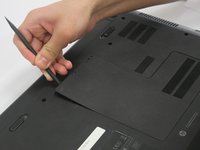
Carefully pry the middle panel up using a plastic spudger, or other prying tool .
-
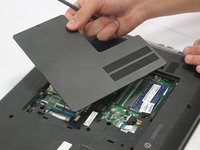
Pull the panel away from the laptop and set it off to the side.
-
-
-
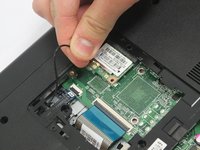
Gently wiggle and lift the black antenna wire away from the wireless card.
-
-
-
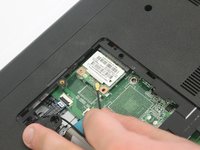
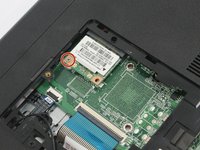
Locate the Phillips 2.0x3.0mm screw on the upper left corner of the wireless card.
-
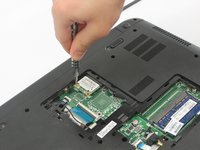
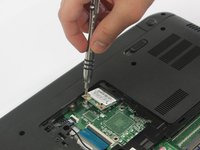
Carefully remove the 2.0x3.0mm screw using a Philips #0 screwdriver.
-
-
-
Slide the wireless card to the left to remove it from the socket.
-
-







To reassemble your device, follow these instructions in reverse order.
Отменить: Я не выполнил это руководство.
Еще один человек закончил это руководство.

Команда

Oakland University, Team 2-2, Ruskiewicz Winter 2017 Участник Oakland University, Team 2-2, Ruskiewicz Winter 2017
OAK-RUSKIEWICZ-W17S2G2
4 членов
Автор 63 руководств
