Перейти к основному содержанию
Присоединяйся к сообществу ремонтников - Создай аккаунт

HP 2000 - 2D22DX Hard Drive Replacement

Выберете то, что вам нужно

  1. HP 2000 - 2D22DX Hard Drive Replacement, Battery: шаг 1, изображение 1 из 2 HP 2000 - 2D22DX Hard Drive Replacement, Battery: шаг 1, изображение 2 из 2
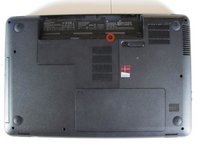
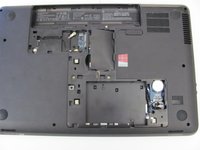
    • Flip the device over and locate the battery compartment.

    • Slide the battery release latch to the left until the battery is detached from its slot.

    • A distinguishable pop will be heard when the battery is fully released.

    Спросите у FixBot
  2. HP 2000 - 2D22DX Hard Drive Replacement: шаг 2, изображение 1 из 2 HP 2000 - 2D22DX Hard Drive Replacement: шаг 2, изображение 2 из 2
    • Slowly pull the battery out of its slot, being careful not to damage any of the connectors in the process.

    Спросите у FixBot
  3. HP 2000 - 2D22DX Hard Drive Replacement, Hard Drive: шаг 3, изображение 1 из 2 HP 2000 - 2D22DX Hard Drive Replacement, Hard Drive: шаг 3, изображение 2 из 2
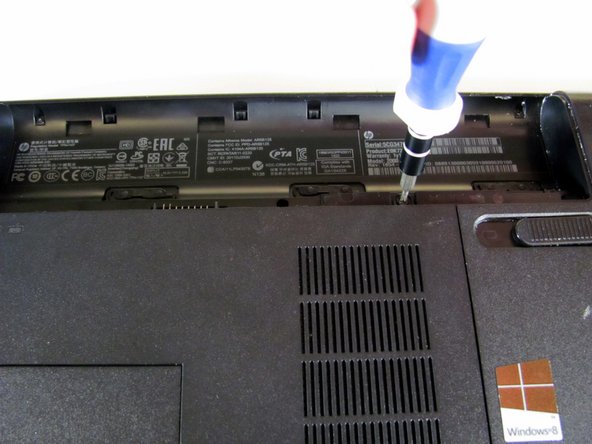
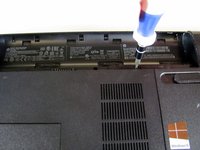
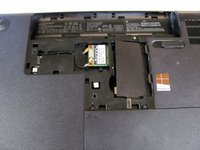
    • Loosen the Phillips #00 screw securing the RAM compartment cover.

    • The screw is permanently attached to the RAM compartment cover. Do not try to remove it completely.

    Спросите у FixBot
  4. HP 2000 - 2D22DX Hard Drive Replacement: шаг 4, изображение 1 из 2 HP 2000 - 2D22DX Hard Drive Replacement: шаг 4, изображение 2 из 2
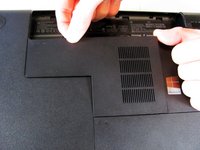
    • Once the screw is sufficiently loosened, slowly unclip the RAM compartment cover from its slots in the plastic chassis.

    • When unclipped completely, pull the compartment door out and away from the chassis.

    Спросите у FixBot
  5. HP 2000 - 2D22DX Hard Drive Replacement: шаг 5, изображение 1 из 3 HP 2000 - 2D22DX Hard Drive Replacement: шаг 5, изображение 2 из 3 HP 2000 - 2D22DX Hard Drive Replacement: шаг 5, изображение 3 из 3
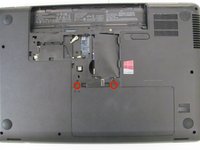
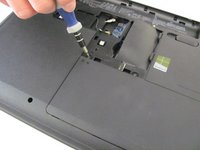
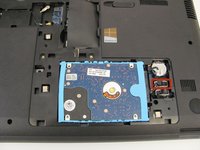
    • Loosen the two Phillips #00 screws that are securing the hard drive compartment.

    • The screws are permanently attached to the hard drive compartment cover. Do not try to remove them completely.

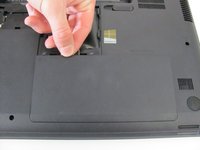
    • Once the screws are sufficiently loosened, disconnect the clips holding the cover in place and slowly pull the cover away from the plastic chassis.

    Спросите у FixBot
  6. HP 2000 - 2D22DX Hard Drive Replacement: шаг 6, изображение 1 из 3 HP 2000 - 2D22DX Hard Drive Replacement: шаг 6, изображение 2 из 3 HP 2000 - 2D22DX Hard Drive Replacement: шаг 6, изображение 3 из 3
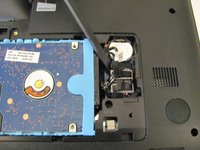
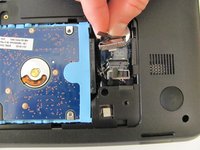
    • Using a spudger, disconnect the hard drive connecting cable. Use a slow, prying motion as if pulling a nail out of wood.

    • Be very gentle with the connecting cable and its respective port on the logic board. Both are very fragile and can be easily damaged.

    Спросите у FixBot
  7. HP 2000 - 2D22DX Hard Drive Replacement: шаг 7, изображение 1 из 3 HP 2000 - 2D22DX Hard Drive Replacement: шаг 7, изображение 2 из 3 HP 2000 - 2D22DX Hard Drive Replacement: шаг 7, изображение 3 из 3
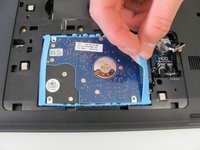
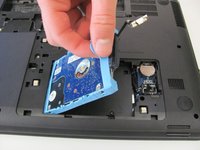
    • Using your fingers, grab the blue tab on the right side of the hard drive and slowly pull upwards.

    • Lift the hard drive out and away from its socket in the plastic chassis.

    Спросите у FixBot
Заключение

To reassemble your device, follow these instructions in reverse order.

27 человек успешно провели ремонт по этому руководству.

Conor Most

Участник с: 04/14/14

2 736 Репутация

Автор 6 руководств

Команда

Cal Poly, Team 3-40, Maness Spring 2014 Участник Cal Poly, Team 3-40, Maness Spring 2014

CPSU-MANESS-S14S3G40

4 членов

Автор 6 руководств

0 Комментарии к руководству

Добавить комментарий

Статистика просмотров:

За последние 24 часов: 3

За последние 7 дней: 12

За последние 30 дней: 73

За всё время: 15,583