Перейти к основному содержанию
Присоединяйся к сообществу ремонтников - Создай аккаунт

HP 225 G7 Battery Replacement

Выберете то, что вам нужно

  1. HP 225 G7 Battery Replacement, Flip The Laptop Upside Down: шаг 1, изображение 1 из 1
    • Firstly, flip the laptop upside down, so that you are looking at the bottom of it, and the hinge of the screen is facing away from you.

    Спросите у FixBot
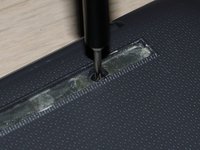
  2. HP 225 G7 Battery Replacement, Remove The Rubber "Leg": шаг 2, изображение 1 из 2 HP 225 G7 Battery Replacement, Remove The Rubber "Leg": шаг 2, изображение 2 из 2
    • Use the metal spuger (or another tool, just make sure its not too sharp) to remove the rubber "leg", all the way until it is completely removed.

    Спросите у FixBot
  3. HP 225 G7 Battery Replacement, Remove The Upper Rubber "Leg": шаг 3, изображение 1 из 1
    • Repeat for the top rubber.

    Спросите у FixBot
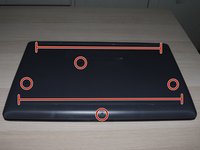
  4. HP 225 G7 Battery Replacement, Unscrew: шаг 4, изображение 1 из 3 HP 225 G7 Battery Replacement, Unscrew: шаг 4, изображение 2 из 3 HP 225 G7 Battery Replacement, Unscrew: шаг 4, изображение 3 из 3
    • Unscrew all the screws from the laptop, including the ones that were under the rubber "legs".

    • There should be 11 screws in total. (4 under the upper leg, 3 under the lower one, and 4 that were not under rubber).

    Спросите у FixBot
  5. HP 225 G7 Battery Replacement, Start Inserting The Picks: шаг 5, изображение 1 из 1
    • Carefully insert a pick under the touchpad of the laptop.

    Спросите у FixBot
  6. HP 225 G7 Battery Replacement, Continue Inserting Picks: шаг 6, изображение 1 из 1
    • Continue inserting picks all the way around the laptop.

    Спросите у FixBot
  7. HP 225 G7 Battery Replacement: шаг 7, изображение 1 из 1
    • Pull apart the cover and the body of the laptop.

    • If you find resistance, reduce the angle of the screen hinge, since the hinge might be "clamping" the cover.

    • If you still find resistance, check for any forgotten screws on the bottom. Never apply too much pressure if there is a lot of resistance.

    Спросите у FixBot
  8. HP 225 G7 Battery Replacement: шаг 8, изображение 1 из 1
    • Finally, the bottom of the laptop should look like that.

    Спросите у FixBot
  9. HP 225 G7 Battery Replacement, Locate and unscrew the 3 screws holding the battery: шаг 9, изображение 1 из 1
    • Locate and unscrew the 3x Philips 1 screws that hold the battery.

    Спросите у FixBot
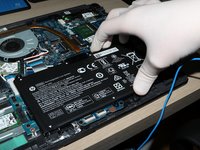
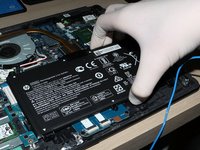
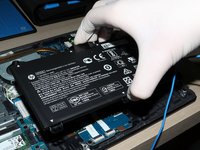
  10. HP 225 G7 Battery Replacement, Remove the battery: шаг 10, изображение 1 из 3 HP 225 G7 Battery Replacement, Remove the battery: шаг 10, изображение 2 из 3 HP 225 G7 Battery Replacement, Remove the battery: шаг 10, изображение 3 из 3
    • After unscrewing the 3 screws, pull the top side of the battery up then slide it out to remove it.

    • Fire Hazard : Always handle lithium batteries with caution.

    Спросите у FixBot
Заключение

To reassemble your device, follow these instructions in reverse order.

Еще один человек закончил это руководство.

Stratos Thivaios

Участник с: 02/27/23

1 423 Репутация

Автор 5 руководств

0 Комментарии к руководству

Добавить комментарий

Статистика просмотров:

За последние 24 часов: 3

За последние 7 дней: 17

За последние 30 дней: 84

За всё время: 982