Перейти к основному содержанию
Присоединяйся к сообществу ремонтников - Создай аккаунт

HP Compaq nc8430 Spacebar Replacement

Выберете то, что вам нужно

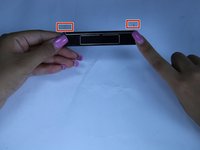
  1. HP Compaq nc8430 Spacebar Replacement, Spacebar: шаг 1, изображение 1 из 1
    • slide the latch to the right

    • slowly raise screen up

  2. HP Compaq nc8430 Spacebar Replacement: шаг 2, изображение 1 из 3 HP Compaq nc8430 Spacebar Replacement: шаг 2, изображение 2 из 3 HP Compaq nc8430 Spacebar Replacement: шаг 2, изображение 3 из 3
    • Place a plastic opening tool, under the edge of the space bar and gently pry up to release the spacebar.

  3. HP Compaq nc8430 Spacebar Replacement: шаг 3, изображение 1 из 2 HP Compaq nc8430 Spacebar Replacement: шаг 3, изображение 2 из 2
    • observe the long metal rod attached to the bottom of the space bar

    • unhook the ends of the metal rod from the keyboard, completely removing the space bar key

    • if you notice any dust, dip a cotton swab in alcohol and clean the area under the space bar

Заключение

To reassemble your device, follow these instructions in reverse order.

Еще один человек закончил это руководство.

Andres Castro

Участник с: 03/20/17

160 Репутация

1 руководство автора

Команда

Texas Tech, Team S13-G4, Bennett Spring 2017 Участник Texas Tech, Team S13-G4, Bennett Spring 2017

TTU-BENNETT-S17S13G4

5 членов

Автор 5 руководств

0 Комментарии к руководству

Добавить комментарий

Статистика просмотров:

За последние 24 часов: 1

За последние 7 дней: 9

За последние 30 дней: 37

За всё время: 631