Перейти к основному содержанию
Присоединяйся к сообществу ремонтников - Создай аккаунт

HP Envy 700-030qe RAM Replacement

Выберете то, что вам нужно

  1. HP Envy 700-030qe RAM Replacement, RAM: шаг 1, изображение 1 из 3 HP Envy 700-030qe RAM Replacement, RAM: шаг 1, изображение 2 из 3 HP Envy 700-030qe RAM Replacement, RAM: шаг 1, изображение 3 из 3
    • Make sure that you are wearing your anti-static wristband. This will prevent damaging any internal parts with any built up static electricity.

    • Unscrew the 10.5mm screw on the left of the desktop using your hand.

    • If it is too tight you may use a torx-head screwdriver or a flat-head screwdriver.

    Спросите у FixBot
  2. HP Envy 700-030qe RAM Replacement: шаг 2, изображение 1 из 2 HP Envy 700-030qe RAM Replacement: шаг 2, изображение 2 из 2
    • You can now slide off the side panel of the desktop.

    • You should now have an opening on the side of your computer as shown in the second picture.

    • The location of the RAM is highlighted in red.

    Спросите у FixBot
  3. HP Envy 700-030qe RAM Replacement: шаг 3, изображение 1 из 2 HP Envy 700-030qe RAM Replacement: шаг 3, изображение 2 из 2
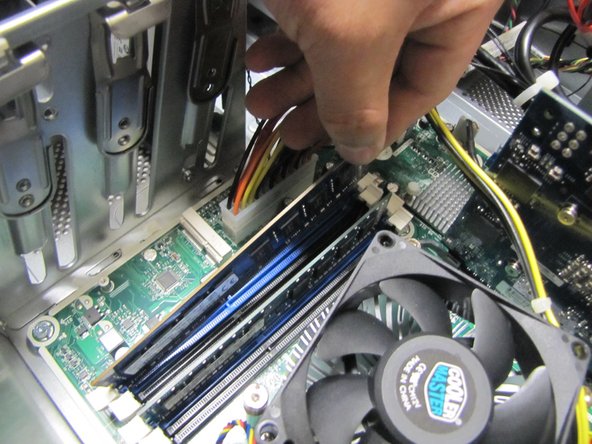
    • Undo the clips on each end of the chip as shown in the second picture.

    • Then you may carefully remove the RAM chips by pulling them out by their the ends.

    • Make sure you pull the chips out by the ends and not grabbing the entire thing. This may damage the chips.

    • Remember the slots that you take the RAM chips from. You must put the two replacement chips in the same slots.

    Спросите у FixBot
Заключение

To reassemble your device, follow these instructions in reverse order.

Sam Wheeler

Участник с: 10/01/15

228 Репутация

1 руководство автора

Команда

Cal Poly, Team 5-9, Maness Fall 2015 Участник Cal Poly, Team 5-9, Maness Fall 2015

CPSU-MANESS-F15S5G9

4 членов

Автор 10 руководств

0 Комментарии к руководству

Добавить комментарий

Статистика просмотров:

За последние 24 часов: 0

За последние 7 дней: 0

За последние 30 дней: 32

За всё время: 1,098