Перейти к основному содержанию
Присоединяйся к сообществу ремонтников - Создай аккаунт

HP G62-234DX RAM Replacement Replacement

Выберете то, что вам нужно

  1. HP G62-234DX RAM Replacement Replacement, Battery: шаг 1, изображение 1 из 1
    • Make sure the computer is turned off, disconnected from the charger, and on a steady surface.

    • Unlock the battery by sliding the button just below it, to the left.

    Спросите у FixBot
  2. HP G62-234DX RAM Replacement Replacement: шаг 2, изображение 1 из 1
    • While pushing the lock button to the unlock position, slide the battery out and away from the laptop.

    • When sliding the new battery back into the socket, you'll know it's secure when you hear a click.

    Спросите у FixBot
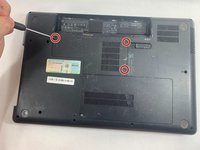
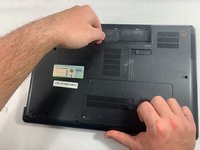
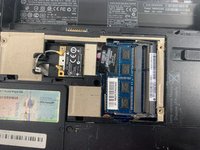
  3. HP G62-234DX RAM Replacement Replacement, RAM: шаг 3, изображение 1 из 3 HP G62-234DX RAM Replacement Replacement, RAM: шаг 3, изображение 2 из 3 HP G62-234DX RAM Replacement Replacement, RAM: шаг 3, изображение 3 из 3
    • Use a Phillips #0 screwdriver to remove three screws from the back panel.

    • Carefully pull the panel off of the back of the laptop to reveal the RAM sticks.

    Спросите у FixBot
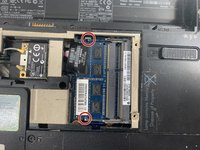
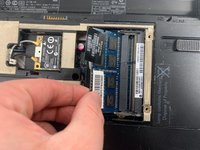
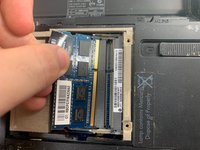
  4. HP G62-234DX RAM Replacement Replacement: шаг 4, изображение 1 из 3 HP G62-234DX RAM Replacement Replacement: шаг 4, изображение 2 из 3 HP G62-234DX RAM Replacement Replacement: шаг 4, изображение 3 из 3
    • Two clips secure the RAM stick in place, one on each side. Using your fingers, spread the clips away from the RAM stick.

    • When released, the RAM stick will pop up at a slight angle.

    • Lift the RAM stick to an angle of about 30 degrees and slide it out.

    • When handling the RAM stick, only touch the outside edges. Take care not to touch the gold-colored contact points along the bottom edge.

    • To install a new RAM stick, slide it in place at about the same angle until it's snug, and then swing it downward until the two clips snap into place.

    Спросите у FixBot
Заключение

To reassemble your device, follow these instructions in reverse order.

Cameron Popillo

Участник с: 03/20/23

337 Репутация

Автор 4 руководств

Команда

UMass Dartmouth, Team 5-1, Ramos Spring 2023 Участник UMass Dartmouth, Team 5-1, Ramos Spring 2023

UMASSD-RAMOS-S23S5G1

3 членов

Автор 4 руководств

0 Комментарии к руководству

Добавить комментарий

Статистика просмотров:

За последние 24 часов: 1

За последние 7 дней: 1

За последние 30 дней: 40

За всё время: 394