Перейти к основному содержанию
Присоединяйся к сообществу ремонтников - Создай аккаунт

HP Mini 110-3735dx Keyboard Replacement

Выберете то, что вам нужно

  1. HP Mini 110-3735dx Keyboard Replacement, Battery: шаг 1, изображение 1 из 3 HP Mini 110-3735dx Keyboard Replacement, Battery: шаг 1, изображение 2 из 3 HP Mini 110-3735dx Keyboard Replacement, Battery: шаг 1, изображение 3 из 3
    • With the bottom of the HP Mini facing up, slide both switches inward towards each other.

    Спросите у FixBot

    Добавить комментарий

  2. HP Mini 110-3735dx Keyboard Replacement: шаг 2, изображение 1 из 2 HP Mini 110-3735dx Keyboard Replacement: шаг 2, изображение 2 из 2
    • With the left switch still pushed inward, pull the battery towards you to remove it from the computer.

    Спросите у FixBot

    Добавить комментарий

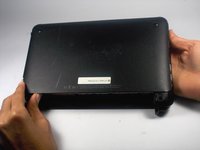
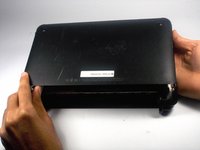
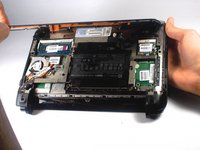
  3. HP Mini 110-3735dx Keyboard Replacement, Backcover: шаг 3, изображение 1 из 3 HP Mini 110-3735dx Keyboard Replacement, Backcover: шаг 3, изображение 2 из 3 HP Mini 110-3735dx Keyboard Replacement, Backcover: шаг 3, изображение 3 из 3
    • Pull upward from under the back cover via the missing battery area.

    • Best to start from one of the corners.

    Спросите у FixBot

    Добавить комментарий

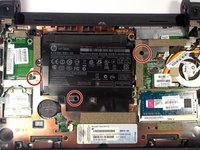
  4. HP Mini 110-3735dx Keyboard Replacement, Keyboard: шаг 4, изображение 1 из 2 HP Mini 110-3735dx Keyboard Replacement, Keyboard: шаг 4, изображение 2 из 2
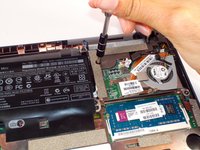
    • Remove the three 4.0 mm screws with the keyboard indicator next to them using a Phillips #1 screw driver.

    Спросите у FixBot

    Добавить комментарий

  5. HP Mini 110-3735dx Keyboard Replacement: шаг 5, изображение 1 из 2 HP Mini 110-3735dx Keyboard Replacement: шаг 5, изображение 2 из 2
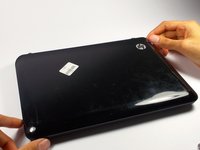
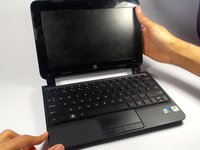
    • Flip the laptop over, and open it up.

    • Don't worry! No pieces will fall out.

    Спросите у FixBot

    Добавить комментарий

  6. HP Mini 110-3735dx Keyboard Replacement: шаг 6, изображение 1 из 2 HP Mini 110-3735dx Keyboard Replacement: шаг 6, изображение 2 из 2
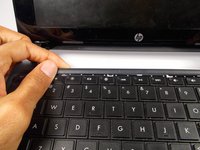
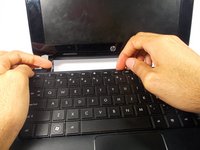
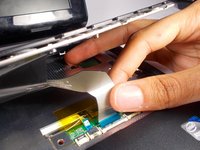
    • With the keyboard facing you, pull the black bezel upward until its loose.

    • You should hear three clicks.

    Спросите у FixBot

    Добавить комментарий

  7. HP Mini 110-3735dx Keyboard Replacement: шаг 7, изображение 1 из 2 HP Mini 110-3735dx Keyboard Replacement: шаг 7, изображение 2 из 2
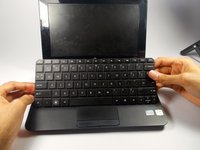
    • Move and hold the bezel slightly towards the screen while lifting the keyboard from the top.

    Спросите у FixBot

    Добавить комментарий

  8. HP Mini 110-3735dx Keyboard Replacement: шаг 8, изображение 1 из 1
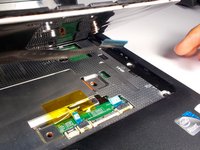
    • Pull up the keyboard from the bottom corners exposing the keyboard cable.

    Спросите у FixBot

    Добавить комментарий

  9. HP Mini 110-3735dx Keyboard Replacement: шаг 9, изображение 1 из 2 HP Mini 110-3735dx Keyboard Replacement: шаг 9, изображение 2 из 2
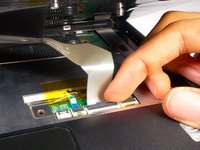
    • Lift the black holder connected to the keyboard cable until it points up.

    Спросите у FixBot

    Добавить комментарий

  10. HP Mini 110-3735dx Keyboard Replacement: шаг 10, изображение 1 из 2 HP Mini 110-3735dx Keyboard Replacement: шаг 10, изображение 2 из 2
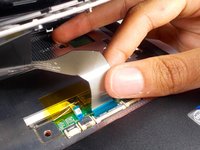
    • Gently pull the keyboard cable from the socket.

    Спросите у FixBot

    Добавить комментарий

Заключение

To reassemble your device, follow these instructions in reverse order.

Отменить: Я не выполнил это руководство.

Tyrone Williams

Участник с: 03/10/16

923 Репутация

Автор 7 руководств

Команда

UMass Dartmouth, Team 4-1, Catania Spring 2016 Участник UMass Dartmouth, Team 4-1, Catania Spring 2016

UMASSD-CATANIA-S16S4G1

4 членов

Автор 7 руководств

0 Комментарии к руководству

Добавить комментарий

Статистика просмотров:

За последние 24 часов: 3

За последние 7 дней: 5

За последние 30 дней: 28

За всё время: 1,052