Введение
If the keyboard on your laptop is malfunctioning, has numerous missing keys, or is broken, it will need to be replaced. Once a replacement is purchased, follow this guide to effectively replace it.
Выберете то, что вам нужно
-
-
-
Open your laptop. Beneath the screen, here is a large plastic piece that contains slots for a speaker, the power button, and numerous indicator lights.
-
To remove this, pry it open with a spudger tool gently. It should pop out of place.
 Спросите у FixBot
-
-
-
-
Remove the three 6mm screws using a Phillips #1 screwdriver.
-
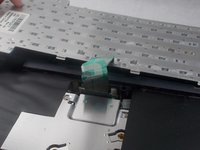
Once the screws are removed, the keyboard is free from the base of the laptop.
-
-
-
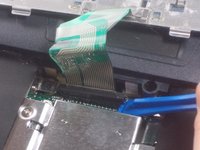
Disconnect the green ribbon cable using a plastic opening tool.
-
-


To reassemble your device, follow these instructions in reverse order.
Отменить: Я не выполнил это руководство.
Еще один человек закончил это руководство.

Команда

UMass Dartmouth, Team S3-G8, Peak Spring 2018 Участник UMass Dartmouth, Team S3-G8, Peak Spring 2018
UMASSD-PEAK-S18S3G8
3 членов
Автор 8 руководств
