Перейти к основному содержанию
Присоединяйся к сообществу ремонтников - Создай аккаунт

HP Pavilion dv4-4141us RAM Replacement

Выберете то, что вам нужно

    1. HP Pavilion dv4-4141us RAM Replacement, RAM: шаг 1, изображение 1 из 1
      • Lift up the back panel using a spudger and remove it from the device.

      Спросите у FixBot

      Добавить комментарий

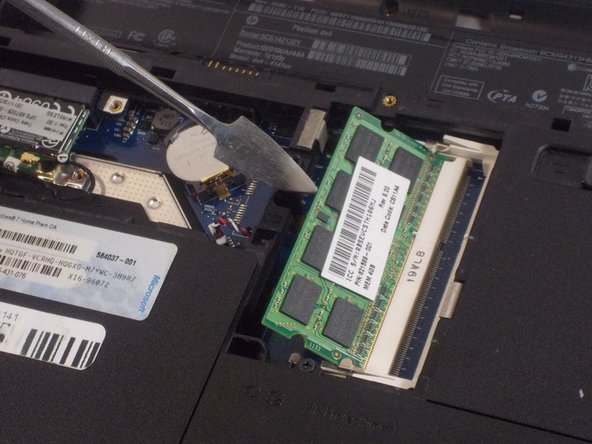
    2. HP Pavilion dv4-4141us RAM Replacement: шаг 2, изображение 1 из 1
      • Push the two metal clips away from each other to release the RAM.

      Спросите у FixBot

      Добавить комментарий

    3. HP Pavilion dv4-4141us RAM Replacement: шаг 3, изображение 1 из 2 HP Pavilion dv4-4141us RAM Replacement: шаг 3, изображение 2 из 2
      • Each RAM stick will pop up at a 45 degree angle.

      • Pull the RAM up and away and remove it from the device.

      • Do not use a metal spudger for this step. Incorrect use of the metal spudger can damage the internal components in your device.

      Спросите у FixBot

      Добавить комментарий

Заключение

To reassemble your device, follow these instructions in reverse order.

Отменить: Я не выполнил это руководство.

Vincent Gardner

Участник с: 10/25/21

390 Репутация

Автор 3 руководств

Команда

UMass Dartmouth, Team 2-3, Sinclaire Fall 2021 Участник UMass Dartmouth, Team 2-3, Sinclaire Fall 2021

UMASSD-SINCLAIRE-F21S2G3

3 членов

Автор 70 руководств

0 Комментарии к руководству

Добавить комментарий

Статистика просмотров:

За последние 24 часов: 1

За последние 7 дней: 5

За последние 30 дней: 24

За всё время: 302