Введение
Before beginning, be absolutely sure the battery needs replacing. The HP Stream 7's battery is taped to the display panel and it is highly likely the battery will be damaged during removal. Everything else should come off with little force: do not try to muscle components free.
Выберете то, что вам нужно
-
-
Make sure the tablet is powered off before beginning.
-
Gently run the plastic opening tool or your fingernails around the tablet to pry the Back Cover from the tablet.
 Спросите у FixBot
-
-
-
-
Remove the eight 5 mm Phillips 000 screws.
-
Gently run the plastic opening tool around the seam to pry the mid back cover from the tablet.
-
-
Инструмент, используемый на этом этапе:Tweezers$4.99
-
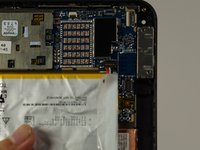
Using tweezers, gently pull the battery connector towards the battery to remove it from the System Board.
-
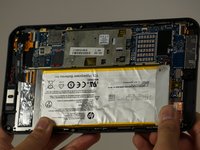
Pull the blue tabs (Not Shown) out from the tablet at an angle to remove the tape underneath the Battery.
-


To reassemble your device, follow these instructions in reverse order.
Отменить: Я не выполнил это руководство.
3 человек успешно провели ремонт по этому руководству.

Команда

Cal Poly, Team 18-5, Forte Fall 2016 Участник Cal Poly, Team 18-5, Forte Fall 2016
CPSU-FORTE-F16S18G5
4 членов
Автор 6 руководств
