Перейти к основному содержанию
Присоединяйся к сообществу ремонтников - Создай аккаунт

HP ZBook 15 Hard Drive Disassembly

Абсолютно необходимое руководство
Это руководство только для предварительной подготовки! Этот гайд является частью другой процедуры и не предназначен для самостоятельного использования.

Выберете то, что вам нужно

  1. HP ZBook 15 Hard Drive Disassembly, Battery: шаг 1, изображение 1 из 2 HP ZBook 15 Hard Drive Disassembly, Battery: шаг 1, изображение 2 из 2
    • Flip the laptop over.

    • Slide the lever with the battery symbol beside it firmly until the battery pops out.

    • Remove the battery from the laptop.

  2. HP ZBook 15 Hard Drive Disassembly, Back Cover: шаг 2, изображение 1 из 1
    • Slide the right lever firmly to the right.

    • Slide the cover towards yourself to remove it.

  3. HP ZBook 15 Hard Drive Disassembly, HP ZBook 15 Hard Drive Disassembly: шаг 3, изображение 1 из 1
    • Unscrew the three captive screws holding the drive in place with a Phillips #0 screwdriver.

    • The screws will remain inside the springs of the hard drive caddy cover.

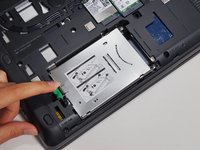
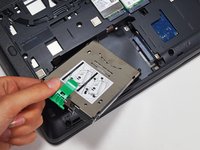
  4. HP ZBook 15 Hard Drive Disassembly: шаг 4, изображение 1 из 2 HP ZBook 15 Hard Drive Disassembly: шаг 4, изображение 2 из 2
    • Pull the green tab away from the metal casing and lift the drive out.

Заключение

To reassemble your device, follow these instructions in reverse order.

Grant Terris

Участник с: 01/30/15

2 882 Репутация

Автор 12 руководств

Команда

Cal Poly, Team 8-43, Amido Winter 2015 Участник Cal Poly, Team 8-43, Amido Winter 2015

CPSU-AMIDO-W15S8G43

4 членов

Автор 15 руководств

0 Комментарии к руководству

Добавить комментарий

Статистика просмотров:

За последние 24 часов: 1

За последние 7 дней: 5

За последние 30 дней: 9

За всё время: 375