Перейти к основному содержанию
Присоединяйся к сообществу ремонтников - Создай аккаунт

HTC Evo 4G Front Facing Camera Replacement

Выберете то, что вам нужно

  1. HTC Evo 4G Front Facing Camera Replacement, Rear Panel: шаг 1, изображение 1 из 1
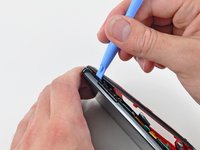
    • Gently insert an iPod opening tool between the rear panel and the inner rear frame near the headphone jack.

    • Use your iPod opening tool to pry up the rear case around the perimeter of the Evo.

    Спросите у FixBot
  2. HTC Evo 4G Front Facing Camera Replacement: шаг 2, изображение 1 из 1
    • Lift the rear panel off of the inner rear frame.

    Спросите у FixBot
  3. HTC Evo 4G Front Facing Camera Replacement, Battery: шаг 3, изображение 1 из 2 HTC Evo 4G Front Facing Camera Replacement, Battery: шаг 3, изображение 2 из 2
    • Using the tip of your finger, lift the battery from the end closest to the camera.

    • Remove the battery from the rear inner frame.

    Спросите у FixBot
  4. HTC Evo 4G Front Facing Camera Replacement, MicroSD card: шаг 4, изображение 1 из 1
    • Use the flat end of a spudger to pry up the red MicroSD retainer attached to the inner frame.

    • The retainer will move about 1 mm and stop. Do not attempt to completely remove the MicroSD card retainer.

    Спросите у FixBot
  5. HTC Evo 4G Front Facing Camera Replacement: шаг 5, изображение 1 из 1
    Инструмент, используемый на этом этапе:
    Tweezers
    $4.99
    • Use a pair of tweezers to carefully pull the MicroSD card out of its slot in the inner rear frame.

    Спросите у FixBot
  6. HTC Evo 4G Front Facing Camera Replacement, Rear Inner Frame: шаг 6, изображение 1 из 1
    • Remove six T5 Torx screws securing the rear inner frame to the inner case.

    Спросите у FixBot
  7. HTC Evo 4G Front Facing Camera Replacement: шаг 7, изображение 1 из 1
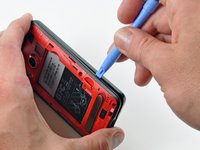
    • Gently insert an iPod opening tool between the rear inner frame and its plastic surround near the Micro HDMI port.

    • Carefully pry the top edge of the rear inner frame away from the front surround of the Evo.

    Спросите у FixBot
  8. HTC Evo 4G Front Facing Camera Replacement: шаг 8, изображение 1 из 2 HTC Evo 4G Front Facing Camera Replacement: шаг 8, изображение 2 из 2
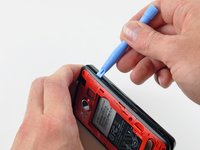
    • Insert the iPod opening tool between the rear inner frame and its plastic surround and pry up at several points along the left edge of the Evo.

    Спросите у FixBot
  9. HTC Evo 4G Front Facing Camera Replacement: шаг 9, изображение 1 из 3 HTC Evo 4G Front Facing Camera Replacement: шаг 9, изображение 2 из 3 HTC Evo 4G Front Facing Camera Replacement: шаг 9, изображение 3 из 3
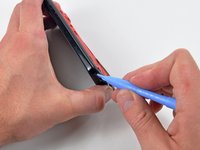
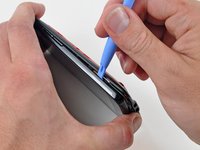
    • Continue the prying procedure, now focusing on detaching the plastic surround from the bottom of the Evo.

    • Pry up the rear inner frame along the right edge using the method described in previous steps.

    • Eventually work around the entire perimeter of the rear inner frame until it is lifted slightly from the inner case.

    Спросите у FixBot
  10. HTC Evo 4G Front Facing Camera Replacement: шаг 10, изображение 1 из 1
    • Remove the rear inner frame from the rest of the Evo.

    Спросите у FixBot
  11. HTC Evo 4G Front Facing Camera Replacement, Motherboard: шаг 11, изображение 1 из 1
    • Remove the single Phillips screw securing the motherboard to the inner case near the headphone jack.

    Спросите у FixBot
  12. HTC Evo 4G Front Facing Camera Replacement: шаг 12, изображение 1 из 1
    • Use the flat end of a spudger to pry the motherboard off the posts securing it to the metal display tray.

    • Do not try to completely remove the motherboard just yet. It is still attached by three ribbon cables.

    Спросите у FixBot
  13. HTC Evo 4G Front Facing Camera Replacement: шаг 13, изображение 1 из 1
    • Carefully peel the device information sticker off the left edge of the motherboard and EMI shield to reveal three connectors covered with tape.

    • It is not necessary to peel the entire device information sticker off the EMI shield.

    Спросите у FixBot
  14. HTC Evo 4G Front Facing Camera Replacement: шаг 14, изображение 1 из 1
    • Fold the device information sticker up against the top of the motherboard to keep it out of the way while you work.

    • Remove the pieces of tape covering the following ribbon cables:

    • Front-facing camera

    • Front panel ribbon cable

    • Display ribbon cable

    Спросите у FixBot
  15. HTC Evo 4G Front Facing Camera Replacement: шаг 15, изображение 1 из 2 HTC Evo 4G Front Facing Camera Replacement: шаг 15, изображение 2 из 2
    Инструмент, используемый на этом этапе:
    Tweezers
    $4.99
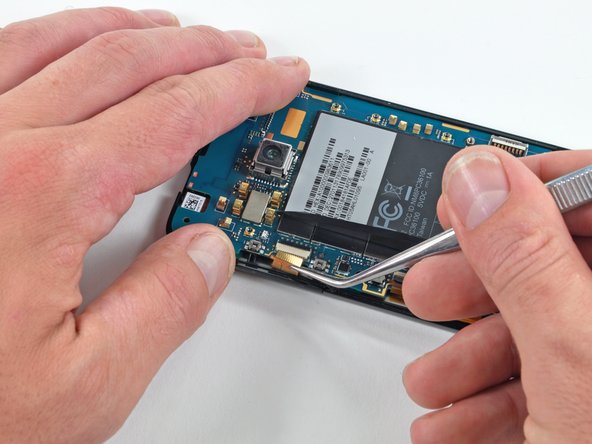
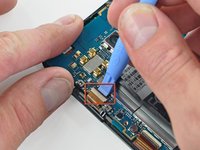
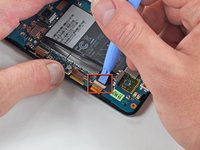
    • Using the tip of an iPod opening tool, flip up the front-facing camera ribbon cable retaining flap.

    • Be very careful and gentle with these flaps. They are very easy to break or dislodge and equally difficult to reinstall.

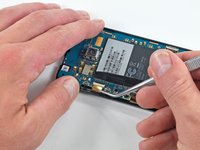
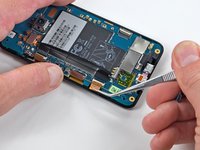
    • Use a pair of tweezers to pull the front-facing camera ribbon cable straight out of its socket.

    Спросите у FixBot
  16. HTC Evo 4G Front Facing Camera Replacement: шаг 16, изображение 1 из 2 HTC Evo 4G Front Facing Camera Replacement: шаг 16, изображение 2 из 2
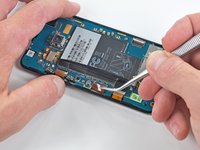
    • Using the tip of an iPod opening tool, flip up the front panel ribbon cable retaining flap.

    • Use a pair of tweezers to pull the front panel ribbon cable straight out of its socket.

    Спросите у FixBot
  17. HTC Evo 4G Front Facing Camera Replacement: шаг 17, изображение 1 из 2 HTC Evo 4G Front Facing Camera Replacement: шаг 17, изображение 2 из 2
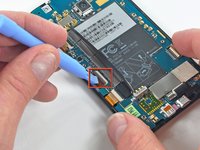
    • Using the tip of an iPod opening tool, flip up the display ribbon cable retaining flap.

    • Grasp the display ribbon cable with a pair of tweezers and pull it straight out of its socket.

    Спросите у FixBot
  18. HTC Evo 4G Front Facing Camera Replacement: шаг 18, изображение 1 из 1
    • Carefully lift the motherboard out of the inner case, minding any cables that may get caught.

    • Be mindful of the top power button and side rocker switch, which may fall out of the front case when the board is removed.

    Спросите у FixBot
  19. HTC Evo 4G Front Facing Camera Replacement, Front Facing Camera: шаг 19, изображение 1 из 1
    • Gently lift the front-facing camera out of its recess in the inner case and remove it from the Evo.

    Спросите у FixBot
Заключение

To reassemble your device, follow these instructions in reverse order.

3 человек успешно провели ремонт по этому руководству.

0 Комментарии к руководству

Добавить комментарий

Статистика просмотров:

За последние 24 часов: 1

За последние 7 дней: 11

За последние 30 дней: 94

За всё время: 24,892