Введение
In this guide you are going to learn how to replace the fingerprint sensor on the HTC One Max phone.
Выберете то, что вам нужно
-
-
-
Lift back cover while pressing highlighted release switch towards the center of the phone.
 Спросите у FixBot
-
-
-
Remove the four white stickers in each corner that cover the Tri-Wing screws.
-
Remove the white sticker near the buttons that control the volume.
-
Remove the white sticker near the SIM card.
-
Remove the big white sticker with the bar-code in the center of the phone.
-
-
-
-
Remove the thirteen Tri-Wing Y00 screws (Upper & Lower screws are 5 mm length, middle screws are 3.8 mm length) from the back case.
-
Disconnect the cable near the volume buttons.
-
-
-
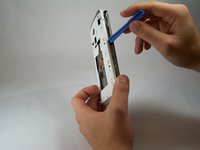
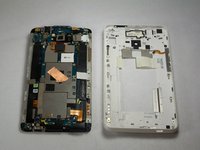
Use the small plastic opening tool to pry between the screen and the rear case.
-
-
-
-
Инструмент, используемый на этом этапе:Tweezers$4.99
-
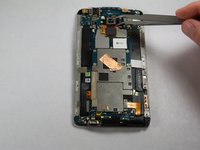
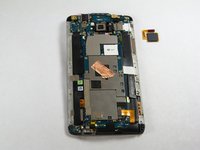
Use Tweezers to disconnect the ribbon cable connecting the fingerprint sensor to the motherboard.
-
When replacing the fingerprint sensor, make sure the ribbon cable snaps into the port on the motherboard.
-
-




To reassemble your device, follow these instructions in reverse order.

Команду

USF Tampa, Team 11-3, Blackwell Fall 2014 Участник USF Tampa, Team 11-3, Blackwell Fall 2014
USFT-BLACKWELL-F14S11G3
4 членов
Автор 84 руководств
