Этот перевод был сделан машиной и пока не проверен человеком. Говорите на этом языке? Просмотрите его.
Введение
В автомобиле Honda Civic 2016 года бесключевой брелок используется как для запирания и отпирания дверей, так и для запуска двигателя. Если батарейка разрядится, завести автомобиль не получится. Это руководство покажет, как заменить литиевую батарейку внутри бесключевого брелока Honda Civic 2016.
Выберете то, что вам нужно
-
-
-
Подготовьте сменный аккумулятор. Вам понадобится один литиевый элемент питания CR2032.
-
Извлеките металлический ключ: сдвиньте переключатель на задней стороне брелока и вытяните ключ.
 Спросите у FixBot
-
-
-
После того как вы вынете ключ, вы увидите 2 пластиковые перемычки. В этом месте можно разделить корпус пульта.
-
Производитель рекомендует использовать монету, но подойдет любой твердый инструмент или даже сам ключ.
-
Производитель рекомендует обернуть монету или инструмент тканью, чтобы не поцарапать пластиковые перемычки.
-
-
-
-
Теперь вы можете осторожно поддеть его и открыть
-
Снимите старый аккумулятор с левой стороны.
-
Помните, что сторона аккумулятора со знаком + должна быть обращена вверх.
-
-
-
Вставьте новую батарейку CR2032, начиная с правой стороны, а затем нажмите на неё. Должен раздаться характерный щелчок.
-
Ещё раз убедитесь, что сторона с маркировкой «+» направлена вверх.
-
-


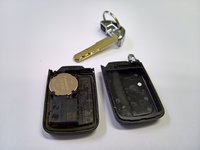
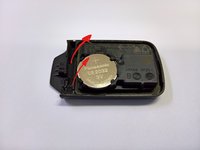
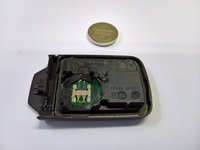


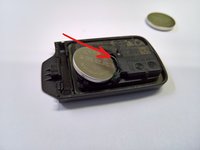

Для сборки устройства выполните эти инструкции в обратном порядке.
Отменить: Я не выполнил это руководство.
18 человек успешно провели ремонт по этому руководству.

Команда

1 Комментарий к руководству
Super Anleitung mit sehr guten Fotos - vielen Dank!
