Перейти к основному содержанию
Присоединяйся к сообществу ремонтников - Создай аккаунт

Hover-1 Nomad Power Button Replacement

Выберете то, что вам нужно

  1. Hover-1 Nomad Power Button Replacement, Outer Shell: шаг 1, изображение 1 из 3 Hover-1 Nomad Power Button Replacement, Outer Shell: шаг 1, изображение 2 из 3 Hover-1 Nomad Power Button Replacement, Outer Shell: шаг 1, изображение 3 из 3
    • Break the two warranty stickers by poking a screwdriver through them or peeling them off.

    • Remove the following twenty screws by rotating the screwdriver counterclockwise:

    • Eight 16.2mm Phillips #2 screws

    • Eight 15mm Phillips #2 screws

    • Four 19.1mm Phillips #2 screws

    • The holes containing most of the screws are deep and narrow. A screwdriver with interchangable bits will not be able to reach them.

    • Do not over-tighten the screws during reassembly. Over-tightened screws can crack the plastic channels holding the shell to the frame of the hoverboard.

    Спросите у FixBot

    Добавить комментарий

  2. Hover-1 Nomad Power Button Replacement: шаг 2, изображение 1 из 3 Hover-1 Nomad Power Button Replacement: шаг 2, изображение 2 из 3 Hover-1 Nomad Power Button Replacement: шаг 2, изображение 3 из 3
    • Use a nylon spudger to pry the metal handle away from the outer shell.

    • Rotate the metal handle toward the center of the hoverboard to unlock the plate from the retaining clips.

    • Lift the hoverboard off the metal handle.

    • Repeat for the handle on the other side of the hoverboard.

    Спросите у FixBot

    Добавить комментарий

  3. Hover-1 Nomad Power Button Replacement: шаг 3, изображение 1 из 1
    • Lift the plastic cover on each side up and away from the device.

    • Multiple wires connect the circuit boards to the outer shell. Remove the shell gently to avoid damaging the wires or components.

    Спросите у FixBot

    Добавить комментарий

  4. Hover-1 Nomad Power Button Replacement: шаг 4, изображение 1 из 2 Hover-1 Nomad Power Button Replacement: шаг 4, изображение 2 из 2
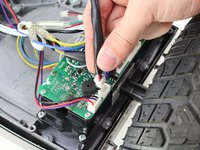
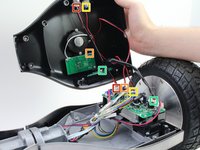
    • Disconnect the following wires by pinching the connector tabs and pulling the plugs out of the connectors:

    • Charging port wires

    • Speaker assembly wires

    • Power button wires

    • Headlight wires

    • Only the headlight wires need to be disconnected from the other circuit board.

    • Ensure the wires are connected to the correct ports on the circuit board during reassembly.

    Спросите у FixBot

    Добавить комментарий

  5. Hover-1 Nomad Power Button Replacement, Power Button: шаг 5, изображение 1 из 2 Hover-1 Nomad Power Button Replacement, Power Button: шаг 5, изображение 2 из 2
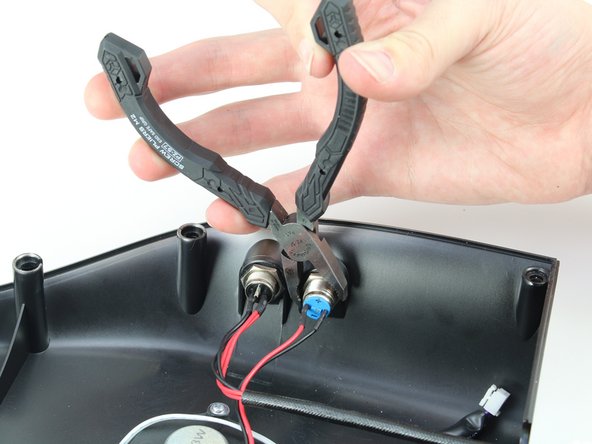
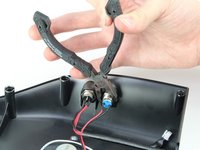
    • Peel off the glue around the power button.

    • Unscrew the hexagonal nut around the power button by rotating the nut counterclockwise with a pair of pliers.

    Спросите у FixBot

    Добавить комментарий

  6. Hover-1 Nomad Power Button Replacement: шаг 6, изображение 1 из 1
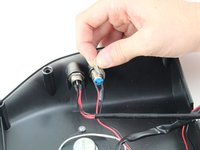
    • Feed the wire and connector through the removed nut and pull the power button out through the hole in the outer casing.

    Спросите у FixBot

    Добавить комментарий

Заключение

To reassemble your device, follow these instructions in reverse order.

Отменить: Я не выполнил это руководство.

Еще один человек закончил это руководство.

Samuel Frazee

Участник с: 10/08/18

1 015 Репутация

Автор 7 руководств

Команда

Cal Poly, Team S15-G1, White Fall 2018 Участник Cal Poly, Team S15-G1, White Fall 2018

CPSU-WHITE-F18S15G1

4 членов

Автор 7 руководств

0 Комментарии к руководству

Добавить комментарий

Статистика просмотров:

За последние 24 часов: 1

За последние 7 дней: 9

За последние 30 дней: 36

За всё время: 630