Перейти к основному содержанию
Присоединяйся к сообществу ремонтников - Создай аккаунт

How To Clean Nikon Coolpix S30 Lens

Выберете то, что вам нужно

    1. How To Clean Nikon Coolpix S30 Lens, Batteries: шаг 1, изображение 1 из 2 How To Clean Nikon Coolpix S30 Lens, Batteries: шаг 1, изображение 2 из 2
      • Slide the battery cover to the right.

      • The hinge is on the left side of the cover which will allow the cover to stay attached.

      Спросите у FixBot

      Добавить комментарий

    2. How To Clean Nikon Coolpix S30 Lens: шаг 2, изображение 1 из 2 How To Clean Nikon Coolpix S30 Lens: шаг 2, изображение 2 из 2
      • Slide the second cover (yellow) to the right (similar to the outer cover). This will allow the batteries to be exposed.

      Спросите у FixBot

      Добавить комментарий

    3. How To Clean Nikon Coolpix S30 Lens: шаг 3, изображение 1 из 1
      • Remove the batteries by gently tipping the camera.

      Спросите у FixBot

      Добавить комментарий

    1. How To Clean Nikon Coolpix S30 Lens, How To Clean Nikon Coolpix S30 Lens: шаг 4, изображение 1 из 1
      • Remove the four screws the hold the back of the case to the rest of the camera.

      Спросите у FixBot

      Добавить комментарий

    2. How To Clean Nikon Coolpix S30 Lens: шаг 5, изображение 1 из 1
      • Remove the left screw from the bottom of the camera first. This can be done using the same T5 tip.

      • Unscrew the screw on the right using a different attachment: PH000 (it is a small Phillip's head)

      Спросите у FixBot

      Добавить комментарий

    3. How To Clean Nikon Coolpix S30 Lens: шаг 6, изображение 1 из 1
      • Remove back case from the rest of the camera carefully.

      Спросите у FixBot

      Добавить комментарий

    4. How To Clean Nikon Coolpix S30 Lens: шаг 7, изображение 1 из 1
      • Remove the three screws the secure the motherboard to the front case.

      Спросите у FixBot

      Добавить комментарий

    5. How To Clean Nikon Coolpix S30 Lens: шаг 8, изображение 1 из 2 How To Clean Nikon Coolpix S30 Lens: шаг 8, изображение 2 из 2
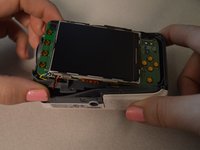
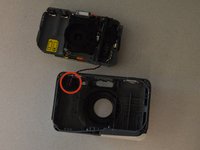
      • Remove the motherboard from the front case.

      • Leave the red and black wire attached but lay the piece in front of the case.

      Спросите у FixBot

      Добавить комментарий

    6. How To Clean Nikon Coolpix S30 Lens: шаг 9, изображение 1 из 2 How To Clean Nikon Coolpix S30 Lens: шаг 9, изображение 2 из 2
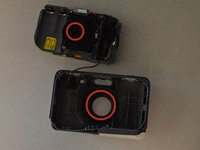
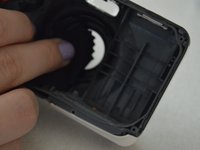
      • Wipe the lens and the clear plastic on the front case to remove debris.

      Спросите у FixBot

      Добавить комментарий

Заключение

To reassemble your device, follow these instructions in reverse order.

Отменить: Я не выполнил это руководство.

Еще один человек закончил это руководство.

Courtney Weida

Участник с: 01/21/15

167 Репутация

1 руководство автора

Команда

Penn State, Team 2-4, Kaschak Winter 2015 Участник Penn State, Team 2-4, Kaschak Winter 2015

PSU-KASCHAK-W15S2G4

4 членов

Автор 5 руководств

1 Комментарий к руководству

The first three steps are redundant because you already included the prerequisite guide for removal of the batteries.

Dylan Keiter - Ответить Поделиться

Добавить комментарий

Статистика просмотров:

За последние 24 часов: 2

За последние 7 дней: 11

За последние 30 дней: 26

За всё время: 2,105