Введение
Replacing the 8GB of ram in my HP zBook studio g3 mobile workstation to 16 GB
Выберете то, что вам нужно
-
-
-
Remove the 4 screws holding down the dust filter
-
Remove the dust filter
 Спросите у FixBot
-
-
-
Remove the 4 outer screws.
-
Remove the 2 inner screws holding the housing down.
-
Now lift the housing. This may require some force
-
-
-
-
Remove the old ram module by pushing these two tabs outwards. The module should swing up
-
Now pull the module out away from the holder
-
-
-
Orient the memory modules such that then notch in the connector lines up with the grove in the module
-
slide the module all the way into the holder such that the pins are in the connector
-
Push down on the module to lock it in the holders
-
-


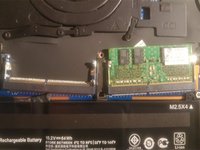

To reassemble your device, follow these instructions in reverse order.
Отменить: Я не выполнил это руководство.
3 человек успешно провели ремонт по этому руководству.

3 Комментарии к руководству
Would be really good to have one for the SSD
I am thinking of expanding the storage on this model. If I get around to it I’ll post a guide
For retail stores like me this is very helpful. I can send to customers so they can upgrade themselves. Thanks for sharing
================================
My Website: Laptop Workstation cũ Tphcm
