Введение
A watch's battery is responsible for maintaining the life-time of the watch. Therefore, a damaged battery will take away from the enjoyment of the watch. This guide highlights the steps required to replace the Huawei Jewel Battery. It can be a relatively difficult process, so follow all steps carefully.
Выберете то, что вам нужно
-
-
-
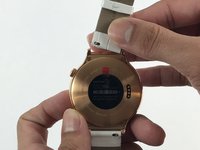
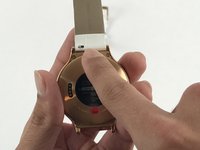
Begin by laying the watch on a flat, smooth surface.
-
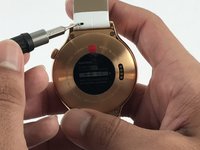
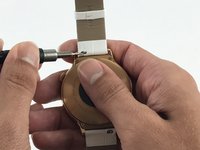
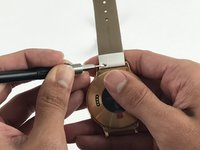
Obtain a Flex Extension with a Size 1.0 mm flat-head. In the case of not having said tool, for this model of watch one can use the hands to replace the strap.
 Спросите у FixBot
-
-
-
Use the Flex Extension to push the spring to the right. This will release the strap from the watch head.
-
-
-
-
-
-
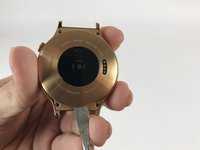
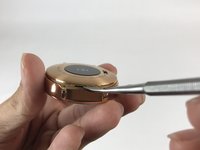
Locate the 4 T3 screws in the back of your watch, and use the T3 Torx Screwdriver to unscrew them.
-
-
Инструмент, используемый на этом этапе:Tweezers$4.99
-
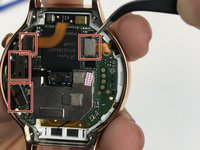
Use tweezers or a nylon spudger to pry up the four press-fit connectors.
-
-
-
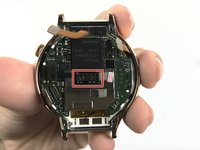
Locate the two Phillips #00 screws holding down the motherboard, and use the Phillips #00 screwdriver to remove them.
-
-
Инструмент, используемый на этом этапе:Spudger$2.99
-
Use the Metal Spudger to lift the mother board from the watch.
-
-
-
-
Инструмент, используемый на этом этапе:iFixit Opening Picks (Set of 6)$4.95
-
Use the spudger or opening pick to carefully lift the battery from the watch.
-
-










To reassemble your device, follow these instructions in reverse order.
Отменить: Я не выполнил это руководство.
21 человек успешно провели ремонт по этому руководству.

Команда

USF Tampa, Team 5-3, Passmore Spring 2017 Участник USF Tampa, Team 5-3, Passmore Spring 2017
USFT-PASSMORE-S17S5G3
4 членов
Автор 3 руководств
8 Комментарии к руководству
Any idea where one can purchase the actual battery? I can’t find one anywhere.
@Chris wellings: i was able to find one on ebay. Arrived quite quickly. And you definitely need a T2(not 3) screwdriver to open up the watch.
Also found one on eBay. I was replacing the battery on the standard Huawei Watch (W1) and this guide was really helpful.
thanks for this great guide, it’s very clear. My W1’s battery is still OK, but I’m anticipating needing to change it sometime and your guide removes the fear!
T2 or T3 Torx ???
