Перейти к основному содержанию
Присоединяйся к сообществу ремонтников - Создай аккаунт

Huawei Watch Jewel Motherboard Replacement

Выберете то, что вам нужно

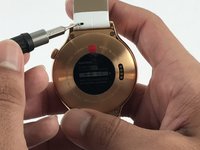
    1. Huawei Watch Jewel Motherboard Replacement, Strap: шаг 1, изображение 1 из 2 Huawei Watch Jewel Motherboard Replacement, Strap: шаг 1, изображение 2 из 2
      • Begin by laying the watch on a flat, smooth surface.

      • This will prevent the watch screen from suffering damage.

      • Obtain a Flex Extension with a Size 1.0 mm flat-head. In the case of not having said tool, for this model of watch one can use the hands to replace the strap.

      Спросите у FixBot

      Добавить комментарий

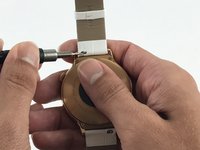
    2. Huawei Watch Jewel Motherboard Replacement: шаг 2, изображение 1 из 2 Huawei Watch Jewel Motherboard Replacement: шаг 2, изображение 2 из 2
      • Locate the two springs on the back of your watch.

      • The watch comes with two of these springs on each side of the back-face. These are used to release the straps from the body of the watch.

      Спросите у FixBot

      Добавить комментарий

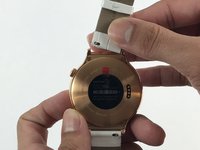
    3. Huawei Watch Jewel Motherboard Replacement: шаг 3, изображение 1 из 3 Huawei Watch Jewel Motherboard Replacement: шаг 3, изображение 2 из 3 Huawei Watch Jewel Motherboard Replacement: шаг 3, изображение 3 из 3
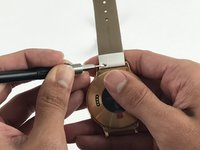
      • Use the Flex Extension to push the spring to the right. This will release the strap from the watch head.

      Спросите у FixBot

      Добавить комментарий

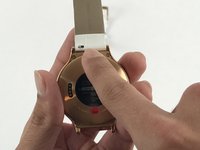
    4. Huawei Watch Jewel Motherboard Replacement: шаг 4, изображение 1 из 1
      • Carefully pull the strap away from the watch.

      Спросите у FixBot

      Добавить комментарий

    5. Huawei Watch Jewel Motherboard Replacement: шаг 5, изображение 1 из 2 Huawei Watch Jewel Motherboard Replacement: шаг 5, изображение 2 из 2
      • Repeat step 3, this time using the other strap.

      Спросите у FixBot

      Добавить комментарий

    1. Huawei Watch Jewel Motherboard Replacement, Motherboard: шаг 6, изображение 1 из 1
      • Locate the 4 T3 screws in the back of your watch, and use the T3 Torx Screwdriver to unscrew them.

      Спросите у FixBot

      Добавить комментарий

    2. Huawei Watch Jewel Motherboard Replacement: шаг 7, изображение 1 из 2 Huawei Watch Jewel Motherboard Replacement: шаг 7, изображение 2 из 2
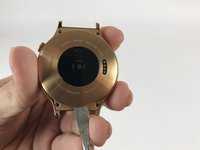
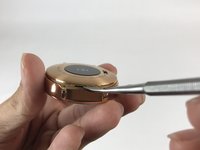
      • Use the Metal Spudger to pry open the back of your watch.

      • Make sure the watch is off and not plugged in when prying into the case with the Metal Spudger to avoid the risk of electric shock.

      Спросите у FixBot

      Добавить комментарий

    3. Huawei Watch Jewel Motherboard Replacement: шаг 8, изображение 1 из 1
      • Remove the back case.

      Спросите у FixBot

      Добавить комментарий

    4. Huawei Watch Jewel Motherboard Replacement: шаг 9, изображение 1 из 2 Huawei Watch Jewel Motherboard Replacement: шаг 9, изображение 2 из 2
      Инструмент, используемый на этом этапе:
      Tweezers
      $4.99
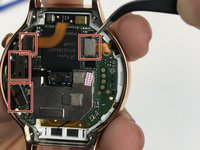
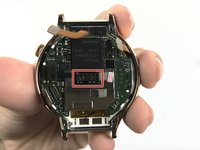
      • Use tweezers or a nylon spudger to pry up the four press-fit connectors.

      • The glued-down connector in the middle is harder to remove than the rest. That is perfectly fine.

      Спросите у FixBot

      Добавить комментарий

    5. Huawei Watch Jewel Motherboard Replacement: шаг 10, изображение 1 из 1
      • Locate the two Phillips #00 screws holding down the motherboard, and use the Phillips #00 screwdriver to remove them.

      • Ensure to place these screws separately from the Torx screws, as they can easily be mixed up.

      Спросите у FixBot

      Добавить комментарий

    6. Huawei Watch Jewel Motherboard Replacement: шаг 11, изображение 1 из 1
      Инструмент, используемый на этом этапе:
      Spudger
      $2.99
      • Use the Metal Spudger to lift the mother board from the watch.

      • The metal spudger may cause damage to the device, use a black nylon spudger when possible.

      Спросите у FixBot

      Добавить комментарий

    7. Huawei Watch Jewel Motherboard Replacement: шаг 12, изображение 1 из 1
      • Remove the motherboard.

      Спросите у FixBot

      Добавить комментарий

Заключение

To reassemble your device, follow these instructions in reverse order.

Отменить: Я не выполнил это руководство.

3 человек успешно провели ремонт по этому руководству.

ngan tran

Участник с: 02/15/17

526 Репутация

Автор 2 руководств

Команда

USF Tampa, Team 5-3, Passmore Spring 2017 Участник USF Tampa, Team 5-3, Passmore Spring 2017

USFT-PASSMORE-S17S5G3

4 членов

Автор 3 руководств

1 Комментарий к руководству

where i can i buy Huawei Watch Jewel Motherboard online?

Mao Sereivathanak - Ответить Поделиться

Добавить комментарий

Статистика просмотров:

За последние 24 часов: 0

За последние 7 дней: 8

За последние 30 дней: 31

За всё время: 3,682