Введение
Replace a faulty speaker.
Выберете то, что вам нужно
-
-
-
Using the plastic opening tool, remove screen protector from front of monitor.
 Спросите у FixBot
-
-
-
Remove the six 4mm screws using a Phillips #00 screwdriver.
-
Remove the screen, exposing the circuit board.
-
Turn device over to expose rear circuit board.
-
-
-
-
Disconnect speaker from monitor for ease of access by unplugging wire.
-
-
-
-
-
Use a heat gun to soften and easily remove epoxy that surrounds the speaker. Gently scrape it free little by little with metal spudger.
-
-
-
Lift the speaker from casing using metal spudger.
-
Place new 8W speaker in the casing and connect wire.
-
-


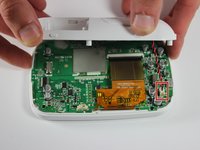
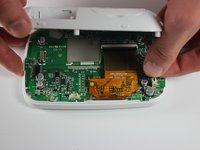
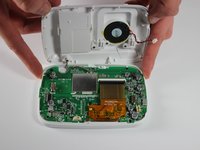


To reassemble your device, follow these instructions in reverse order.
Отменить: Я не выполнил это руководство.
3 человек успешно провели ремонт по этому руководству.

Команда

USF Tampa, Team 6-4, Remmell Fall 2015 Участник USF Tampa, Team 6-4, Remmell Fall 2015
USFT-REMMELL-F15S6G4
4 членов
Автор 23 руководств
5 Комментарии к руководству
Where to purchase the replacement speaker?
Where can we purchase the replacement 8w speaker part
8W Speaker is incorrect.
The speaker needed is 8 Ohm 0.5 Watt.
Thanks for this. Found something on Ali Express, just need to figure out the right size
This is good to show how you get it open. Unless you have a speaker that has the plastic piece that connects to the mother board, then it’s useless. The speaker I ordered just had two free standing wires.
