Этот перевод был сделан машиной и пока не проверен человеком. Говорите на этом языке? Просмотрите его.
Введение
JBL Clip 3 имеет класс водонепроницаемости IPX7 и обеспечивает до 10 часов воспроизведения благодаря литий-ионному аккумулятору емкостью 1000 мАч. Если аккумулятор не заряжается или не держит заряд должным образом, возможно, его потребуется заменить.
В этом руководстве показан пошаговый процесс замены аккумулятора колонки JBL Clip 3. Процесс не очень сложный и не требует специальных навыков. Будьте осторожны при снятии деталей этого устройства, так как они могут быть хрупкими.
Выберете то, что вам нужно
-
-
-
Вставьте инструмент для открывания iFixit между решеткой динамика и корпусом динамика и подденьте по всему периметру устройства, пока решетка не отсоединится.
 Спросите у FixBot
-
-
-
-
-
Используйте отвертку Phillips #1, чтобы выкрутить пять винтов длиной 6,3 мм по периметру.
-
-
-
Инструмент, используемый на этом этапе:Tweezers$4.99
-
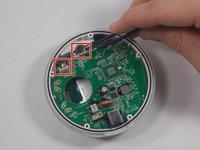
Используйте пинцет, чтобы отсоединить 2-контактный и 4-контактный разъемы от материнской платы.
-
-
-
-
-
Подденьте металлический карабин, чтобы извлечь его из корпуса динамика.
-
-
-
-
Инструмент, используемый на этом этапе:Tweezers$4.99
-
Используйте пинцет, чтобы извлечь два разъема кабелей из гнезд на материнской плате.
-
-
-
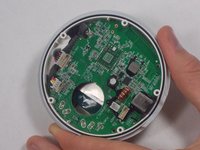
Используйте отвертку Phillips #1, чтобы открутить четыре винта, фиксирующие материнскую плату.
-
-
-
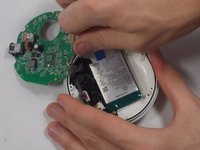
Аккуратно приподнимите материнскую плату, отделяя её от корпуса динамика.
-
-
-
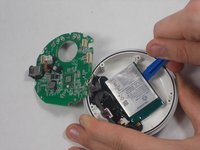
Используйте инструмент для открывания, чтобы аккуратно поддеть аккумулятор по периметру, медленно отделяя его от эпоксидной смолы, пока он полностью не освободится.
-
-


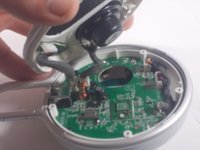
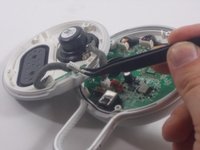


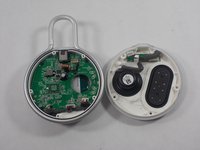
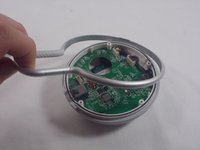




Для обратной сборки устройства выполните эти инструкции в обратном порядке.
Отменить: Я не выполнил это руководство.
6 человек успешно провели ремонт по этому руководству.

Команда

UMass Dartmouth, Team 1-5, Petersen Spring 2022 Участник UMass Dartmouth, Team 1-5, Petersen Spring 2022
UMASSD-PETERSEN-S22S1G5
3 членов
Автор 43 руководств
3 Комментарии к руководству
Thanks, but unless I missed something I don't see the recommended battery to replace with (only that it's a 1000mAh). Under "what you need" there's no mention of battery.
Amazon and others sell them. Just Google "JBL Clip 3 battery for sale". Price varies widely.
Thank you - very helpful guide! Was able to replace my battery with no issues.
