Перейти к основному содержанию
Присоединяйся к сообществу ремонтников - Создай аккаунт

JBL Grip Driver Replacement

Выберете то, что вам нужно

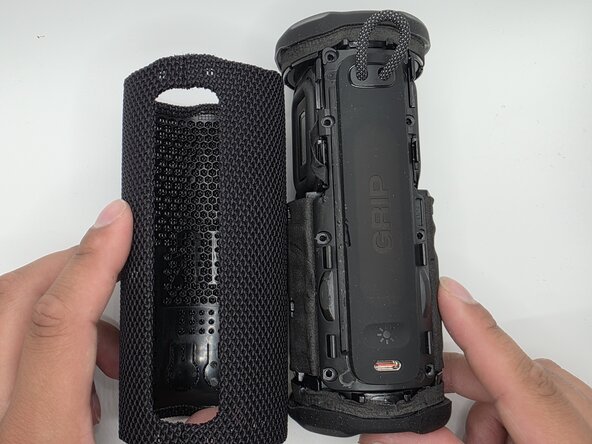
  1. JBL Grip Driver Replacement, Case: шаг 1, изображение 1 из 2 JBL Grip Driver Replacement, Case: шаг 1, изображение 2 из 2
    • Slide the Jimmy along the seam to separate the case.

    • Caution: Do not bend or puncture membrane.

    Спросите у FixBot
  2. JBL Grip Driver Replacement: шаг 2, изображение 1 из 2 JBL Grip Driver Replacement: шаг 2, изображение 2 из 2
    • Unlatch the membrane from the rest of body.

    Спросите у FixBot
  3. JBL Grip Driver Replacement, Driver: шаг 3, изображение 1 из 2 JBL Grip Driver Replacement, Driver: шаг 3, изображение 2 из 2
    • Remove the four 3mm screws securing the speaker cover with a Phillips #2 screwdriver. Pry the speaker assembly from the body with the plastic pry tool.

    • Pry the speaker assembly from the body with an opening tool.

    • Caution: Do not unplug the speaker cover, as doing so could damage the connected cables.

    Спросите у FixBot
  4. JBL Grip Driver Replacement: шаг 4, изображение 1 из 2 JBL Grip Driver Replacement: шаг 4, изображение 2 из 2
    • Use a soldering iron to remove the wires/cables connected to the speaker driver.

    • Caution: Do not touch the soldering with bare hands or fingers as to prevent burning yourself.

    Спросите у FixBot
Заключение

To reassemble your device, follow these instructions in reverse order.

Isaac Loma

Участник с: 02/09/26

777 Репутация

Автор 7 руководств

Команда

University of North Texas, Team 1-4, Kilpatrick Spring 2026 Участник University of North Texas, Team 1-4, Kilpatrick Spring 2026

UNT-KILPATRICK-S26S1G4

5 членов

Автор 8 руководств

0 Комментарии к руководству

Добавить комментарий

Статистика просмотров:

За последние 24 часов: 1

За последние 7 дней: 10

За последние 30 дней: 34

За всё время: 113