Перейти к основному содержанию
Присоединяйся к сообществу ремонтников - Создай аккаунт

Jazz UltraTab C855 Battery Replacement

Выберете то, что вам нужно

  1. Jazz UltraTab C855 Battery Replacement, Back Cover: шаг 1, изображение 1 из 1
    Спросите у FixBot

    Добавить комментарий

  2. Jazz UltraTab C855 Battery Replacement: шаг 2, изображение 1 из 1
    • Pry the back case off using the blue Plastic Opening Tools. Work one along the seem until you can get your fingers under to pull it apart.

    Спросите у FixBot

    Добавить комментарий

  3. Jazz UltraTab C855 Battery Replacement, Battery: шаг 3, изображение 1 из 1
    • Remove the yellow tape from the sides of the battery, and the surrounding components.

    Спросите у FixBot

    Добавить комментарий

  4. Jazz UltraTab C855 Battery Replacement: шаг 4, изображение 1 из 1
    • Cut the pos(+) and neg (-) wires that connect the battery to the device using wire cutters.

    • Cut the wires towards the middle. During installation of your new battery these wires will be stripped back and soldered or crimped to reattach.

    Спросите у FixBot

    Добавить комментарий

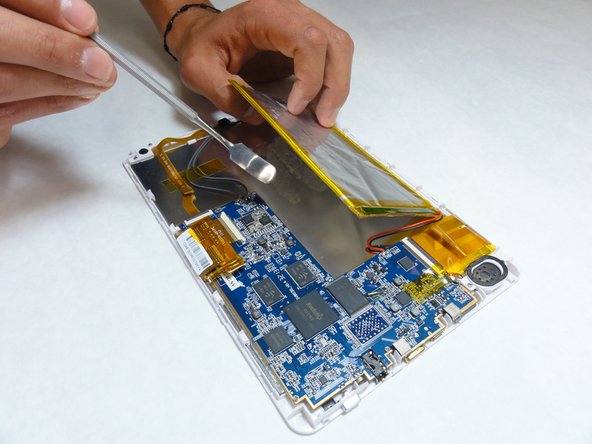
  5. Jazz UltraTab C855 Battery Replacement: шаг 5, изображение 1 из 1
    • Using a plastic opening tool or spudger, slowly pry the battery away from the board.

    • The battery is secured to the device with adhesive.

    • Metal spudgers can puncture an unprotected battery, potentially causing a fire. When working with electronics, it's important to choose a tool that's ESD-safe to avoid accidental damage to the device. The regular black nylon spudger or a plastic opening tool should be used whenever possible.

    Спросите у FixBot

    Добавить комментарий

  6. Jazz UltraTab C855 Battery Replacement: шаг 6, изображение 1 из 1
    • Use a two sided adhesive to secure the new battery in place.

    • Solder or crimp the wires back together to reattach to the motherboard.

    • Replace any yellow tape that you removed at the beginning to secure the wires back in place.

    Спросите у FixBot

    Добавить комментарий

Заключение

To reassemble your device, follow these instructions in reverse order.

Отменить: Я не выполнил это руководство.

Cory Hodge

Участник с: 09/14/15

201 Репутация

Автор 2 руководств

Команда

IUPUI, Team 1-3, Baechle Fall 2015 Участник IUPUI, Team 1-3, Baechle Fall 2015

IUPUI-BAECHLE-F15S1G3

5 членов

Автор 10 руководств

1 Комментарий к руководству

Very good instructions.....but where do I buy the repkacement battery from?

fremontmyers - Ответить Поделиться

Добавить комментарий

Статистика просмотров:

За последние 24 часов: 1

За последние 7 дней: 9

За последние 30 дней: 22

За всё время: 769