Этот перевод был сделан машиной и пока не проверен человеком. Говорите на этом языке? Просмотрите его.
Введение
Это устройство удивительно легко открыть — оно держится только на защелках! Ура! Я хотел начать с публикации первого руководства, чтобы остальные могли продолжить развивать базу инструкций по ремонту. Всегда сложнее всего сделать первый шаг, когда не знаешь, что ждет внутри, но попробуйте — действуйте медленно и осторожно, и вы очень быстро откроете устройство!
Выберете то, что вам нужно
-
-
-
С помощью медиатора и/или пластиковой лопатки (black pry tool) начните с одного из углов, чтобы отделить заднюю крышку от дисплея. Как только угол поддастся, вы сможете приподнять заднюю крышку и продвинуть медиатор к следующему углу
 Спросите у FixBot
-
-
-
Теперь, когда один или несколько углов освободились, вы почти можете разъединить корпус руками, но лучше проявить осторожность и не сломать пластик, продолжив проводить инструментом для открывания вдоль каждого угла (см. фото открытого корпуса для понимания типа защелок)
-
-
-
Ах, чудесный открытый Kindle... приятно. Всё проще, чем мы думали. Никакого липкого клея. И никаких кабелей на задней крышке: просто отщелкнуть, отщелкнуть... щелк, щелк, щелк.
-
-
-
Каким бы ни был ваш следующий ремонт, всегда начинайте с отсоединения аккумулятора — в этом вам поможет черная пластиковая лопатка. Удачи.
-
-
-
-
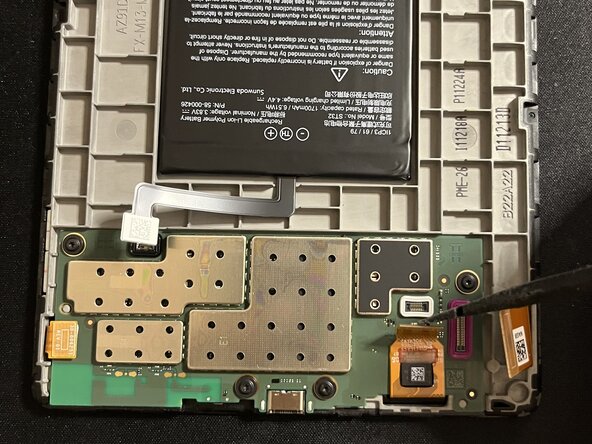
Аккуратно отсоедините все шлейфы от платы. Лучше всего использовать пластиковую или металлическую лопатку (spudger). Используйте антистатические инструменты.
-
-
-
При приподнимании следующего шлейфа обратите внимание, что его нижняя часть может быть приклеена, поэтому будьте осторожны.
-
-
-
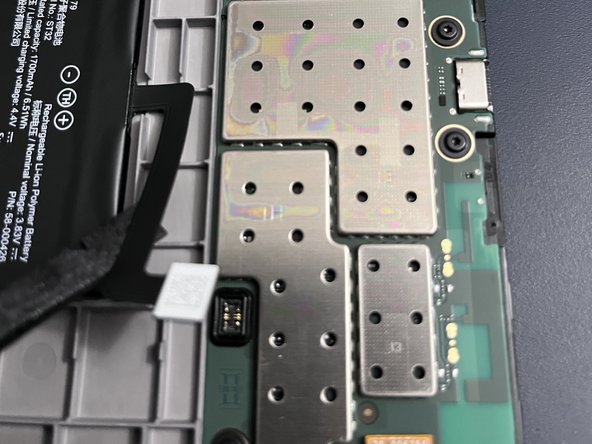
Используйте термофен по периметру платы, так как она приклеена. Уделите особое внимание нижнему левому углу, поскольку там находится более прочная полоска черного клея — именно здесь вы будете прикладывать основные усилия при попытке поддеть плату после нагрева клея. Используйте термостойкий коврик и, как всегда, не перегревайте устройство. Действуйте не спеша.
-
-
-
После нагрева краев и клея начните поддевать нижний угол, надежно зафиксировав устройство. Не торопитесь и при необходимости прогрейте клей снова. Используйте тонкие, самые плоские медиаторы, чтобы постепенно ослабить крепление по краям, стараясь не повредить плату. Учтите, что плату следует приподнимать сверху, так как к ней все еще подключен один шлейф.
-
-






Для сборки устройства выполните эти инструкции в обратном порядке.
Отменить: Я не выполнил это руководство.
16 человек успешно провели ремонт по этому руководству.


8 Комментарии к руководству
Amazing. Thank you! I see my screen data ribbon is missing a pin (it snapped off) but I still have it. Not sure i can fix it but perhaps can get a new ribbon. Do you know the part number?
sorry I cannot locate that, but perhaps another contributor can. best source is likely ebay...
La placa esta pegada al marco? No sale facilmente. Te has quedado en como abrirlo pero luego habria que explicar como quitar la bateria o la placa para cambiar la pantalla
I'm curious, could you upgrade the kindle so that it also has colour for book covers? I unfortunately live in Canada or id be getting the colorsoft plus it's expensive price tag doesn't help either. But could this be a possible thing to do for the kindle paperwhite?
looks like the battery is stuck. Did you manage to remove it (I need to change the eink screen) ?
