Перейти к основному содержанию
Присоединяйся к сообществу ремонтников - Создай аккаунт

LG L1200 External Housing Replacement

Выберете то, что вам нужно

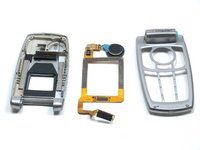
    1. LG L1200 External Housing Replacement, Inner LCD Screen: шаг 1, изображение 1 из 1
      • Make sure you remove the battery by lifting the tab on the back of the phone before opening the case.

      • Flip open the phone and locate the four screw covers.

      Спросите у FixBot

      Добавить комментарий

    2. LG L1200 External Housing Replacement: шаг 2, изображение 1 из 1
      • Remove all four screw covers by using an IPod opening tool. They should come off relatively easy.

      Спросите у FixBot

      Добавить комментарий

    3. LG L1200 External Housing Replacement: шаг 3, изображение 1 из 1
      • Using a T6 Torx screwdriver, remove all four screws.

      Спросите у FixBot

      Добавить комментарий

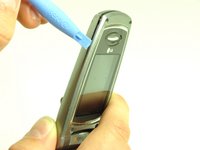
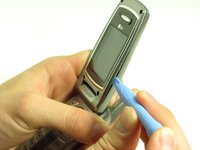
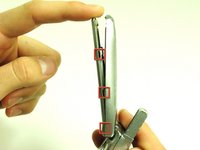
    4. LG L1200 External Housing Replacement: шаг 4, изображение 1 из 3 LG L1200 External Housing Replacement: шаг 4, изображение 2 из 3 LG L1200 External Housing Replacement: шаг 4, изображение 3 из 3
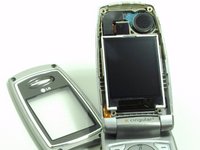
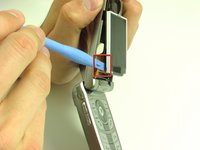
      • Once the screws are removed, use an IPod opening tool to separate the front cover from the inner screen cover.

      • Run the Ipod opening tool down both sides,disconnecting the tabs that hold the covers together.

      Спросите у FixBot

      Добавить комментарий

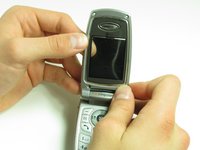
    5. LG L1200 External Housing Replacement: шаг 5, изображение 1 из 2 LG L1200 External Housing Replacement: шаг 5, изображение 2 из 2
      • Pull the inner screen cover towards you and up in order to separate it from the front cover.

      Спросите у FixBot

      Добавить комментарий

    6. LG L1200 External Housing Replacement: шаг 6, изображение 1 из 1
      • Remove the tape from the bottom of the LCD screen.

      Спросите у FixBot

      Добавить комментарий

    7. LG L1200 External Housing Replacement: шаг 7, изображение 1 из 3 LG L1200 External Housing Replacement: шаг 7, изображение 2 из 3 LG L1200 External Housing Replacement: шаг 7, изображение 3 из 3
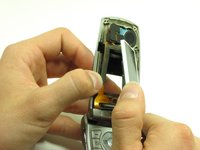
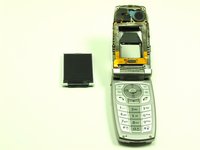
      • Carefully lift the LCD screen and peel it from the gold ribbon. The sticky connection runs all the way around the LCD screen.

      Спросите у FixBot

      Добавить комментарий

    8. LG L1200 External Housing Replacement: шаг 8, изображение 1 из 3 LG L1200 External Housing Replacement: шаг 8, изображение 2 из 3 LG L1200 External Housing Replacement: шаг 8, изображение 3 из 3
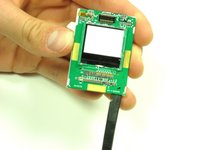
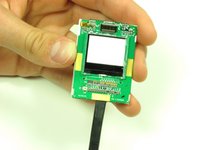
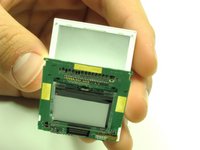
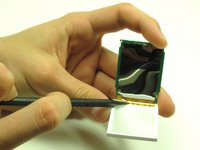
      • Flip the screen over so that you can see the outer LCD screen and the circuit board.

      • Insert spudger in the bottom right corner.

      • Lift up and move the spudger across the bottom.

      • The third photo is rotated 180 degrees.

      Спросите у FixBot

      Добавить комментарий

    9. LG L1200 External Housing Replacement: шаг 9, изображение 1 из 2 LG L1200 External Housing Replacement: шаг 9, изображение 2 из 2
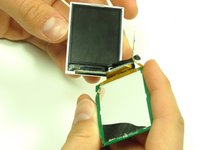
      • Use the pointy side of the spudger to peel off the interior tape.

      • Flip the assembly over and peel the circuit board from the screen.

      Спросите у FixBot

      Добавить комментарий

    10. LG L1200 External Housing Replacement: шаг 10, изображение 1 из 2 LG L1200 External Housing Replacement: шаг 10, изображение 2 из 2
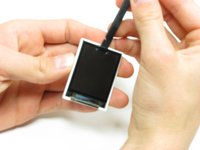
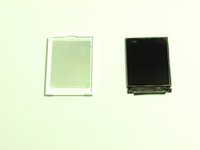
      • Use the spudger to remove the LCD screen from its backing.

      Спросите у FixBot

      Добавить комментарий

    1. LG L1200 External Housing Replacement, Camera: шаг 11, изображение 1 из 1
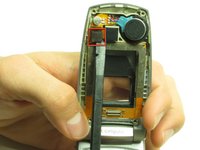
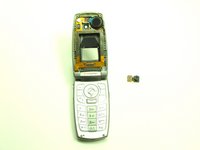
      • Carefully slide the spudger behind the main ribbon in order to separate it from the inside cover of the phone.

      Спросите у FixBot

      Добавить комментарий

    2. LG L1200 External Housing Replacement: шаг 12, изображение 1 из 2 LG L1200 External Housing Replacement: шаг 12, изображение 2 из 2
      • Use a spudger to pop off the camera ribbon from the main ribbon. The camera component should separate entirely.

      Спросите у FixBot

      Добавить комментарий

    1. LG L1200 External Housing Replacement, Logic Board: шаг 13, изображение 1 из 1
      • Make sure you remove the battery by lifting the tab on the back of the phone before opening the case.

      • Poke out rubber covers using a spudger or pointy object, such as a thumb tack.

      Спросите у FixBot

      Добавить комментарий

    2. LG L1200 External Housing Replacement: шаг 14, изображение 1 из 1
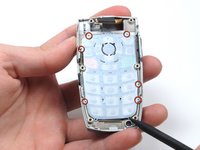
      • Use a T6 torx screwdriver to unscrew the 6 screws that hold the back casing on.

      Спросите у FixBot

      Добавить комментарий

    3. LG L1200 External Housing Replacement: шаг 15, изображение 1 из 1
      • Use IPod opening tool to separate back housing.

      • There are two tabs located on either side of the phone.

      Спросите у FixBot

      Добавить комментарий

    4. LG L1200 External Housing Replacement: шаг 16, изображение 1 из 1
      • Separate the back housing from the phone.

      • Be careful not to rip out the wire (highlighted in yellow) when separating the back housing.

      Спросите у FixBot

      Добавить комментарий

    5. LG L1200 External Housing Replacement: шаг 17, изображение 1 из 1
      • Use a spudger to disconnect antenna wire.

      Спросите у FixBot

      Добавить комментарий

    6. LG L1200 External Housing Replacement: шаг 18, изображение 1 из 1
      • Use the IPod opening tool to pop out the logic board.

      Спросите у FixBot

      Добавить комментарий

    7. LG L1200 External Housing Replacement: шаг 19, изображение 1 из 1
      • Use the IPod opening tool to disconnect the main ribbon.

      Спросите у FixBot

      Добавить комментарий

    8. LG L1200 External Housing Replacement: шаг 20, изображение 1 из 1
      • Once the ribbon is detached, remove the logic board and replace if necessary.

      Спросите у FixBot

      Добавить комментарий

    1. LG L1200 External Housing Replacement, Keypad: шаг 21, изображение 1 из 1
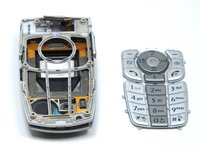
      • The back of the keypad is shown here, next to the logic board (the logic board is turned over to expose the buttons).

      Спросите у FixBot

      Добавить комментарий

    2. LG L1200 External Housing Replacement: шаг 22, изображение 1 из 2 LG L1200 External Housing Replacement: шаг 22, изображение 2 из 2
      • Using a spudger, lift the keypad off of the tabs.

      Спросите у FixBot

      Добавить комментарий

    1. LG L1200 External Housing Replacement, External Housing: шаг 23, изображение 1 из 1
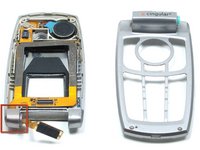
      • Wedge a spudger or another harder prying tool in the connection between the top cover and the bottom cover on the right side.

      • Use a large amount of force to push the top cover off the bottom cover's blue extrusion.

      • Too much force may break the plastic of the top cover

      • When separating the top cover from the bottom cover, be careful not to tear the ribbon as you pull it out from the hinge.

      Спросите у FixBot

      Добавить комментарий

    2. LG L1200 External Housing Replacement: шаг 24, изображение 1 из 2 LG L1200 External Housing Replacement: шаг 24, изображение 2 из 2
      • Slide the ribbon out of the slot in the joint on the left side.

      • Pull the ribbon out of the top cover with your hand.

      • Once the ribbon is removed, you can replace the covers.

      Спросите у FixBot

      Добавить комментарий

Заключение

To reassemble your device, follow these instructions in reverse order.

Отменить: Я не выполнил это руководство.

Joshua Herrmann

Участник с: 04/16/10

8 Репутация

Автор 8 руководств

Команда

Cal Poly, Team 6-14, Maness Spring 2010 Участник Cal Poly, Team 6-14, Maness Spring 2010

CPSU-MANESS-S10S6G14

4 членов

Автор 32 руководств

0 Комментарии к руководству

Добавить комментарий

Статистика просмотров:

За последние 24 часов: 2

За последние 7 дней: 8

За последние 30 дней: 43

За всё время: 1,547