Перейти к основному содержанию
Присоединяйся к сообществу ремонтников - Создай аккаунт

LG Optimus L7 P705 Home Button Replacement

Выберете то, что вам нужно

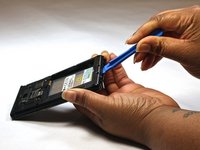
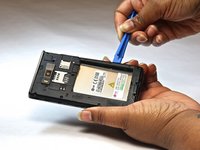
  1. LG Optimus L7 P705 Home Button Replacement, Home Button: шаг 1, изображение 1 из 2 LG Optimus L7 P705 Home Button Replacement, Home Button: шаг 1, изображение 2 из 2
    • Insert a plastic opening tool between the seams of the device and pry the back cover away from the phone.

    • Remove the battery and SIM card.

  2. LG Optimus L7 P705 Home Button Replacement: шаг 2, изображение 1 из 1
    • Remove the twelve screws using the Phillips 000 screwdriver.

  3. LG Optimus L7 P705 Home Button Replacement: шаг 3, изображение 1 из 1
    • Remove bottom plate where the charger port is located.

  4. LG Optimus L7 P705 Home Button Replacement: шаг 4, изображение 1 из 2 LG Optimus L7 P705 Home Button Replacement: шаг 4, изображение 2 из 2
    • Insert a plastic opening tool between the seams of the device and apply some pressure to lift off the cover.

  5. LG Optimus L7 P705 Home Button Replacement: шаг 5, изображение 1 из 1
    • Flip over to the face of the device.

    • Lift off the glass screen (display).

  6. LG Optimus L7 P705 Home Button Replacement: шаг 6, изображение 1 из 1
    • Remove the home screen button. Replace as needed.

Заключение

To reassemble your device, follow these instructions in reverse order.

Еще один человек закончил это руководство.

Bruna

Участник с: 10/08/14

525 Репутация

Автор 4 руководств

Команда

USF Tampa, Team 9-1, Leahy Fall 2014 Участник USF Tampa, Team 9-1, Leahy Fall 2014

USFT-LEAHY-F14S9G1

3 членов

Автор 5 руководств

1 Комментарий к руководству

in the step 2, one red ring is in the wrong position.

The ring in the midle at the left side is in the center of the telephone

Tiago - Ответить Поделиться

Добавить комментарий

Статистика просмотров:

За последние 24 часов: 2

За последние 7 дней: 8

За последние 30 дней: 30

За всё время: 1,989