Перейти к основному содержанию
Присоединяйся к сообществу ремонтников - Создай аккаунт

LG Tribute Touchscreen Replacement

Выберете то, что вам нужно

  1. LG Tribute Touchscreen Replacement, Battery: шаг 1, изображение 1 из 2 LG Tribute Touchscreen Replacement, Battery: шаг 1, изображение 2 из 2
    • Use the plastic opening tool to pry off the back cover.

    Спросите у FixBot

    Добавить комментарий

  2. LG Tribute Touchscreen Replacement: шаг 2, изображение 1 из 1
    • Lift the battery out of place.

    • When replacing the battery, the (+) and (-) symbols must match up with the phone's charging nodes.

    Спросите у FixBot

    Добавить комментарий

  3. LG Tribute Touchscreen Replacement, Mid-panel: шаг 3, изображение 1 из 2 LG Tribute Touchscreen Replacement, Mid-panel: шаг 3, изображение 2 из 2
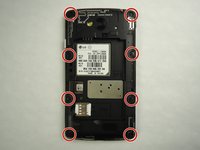
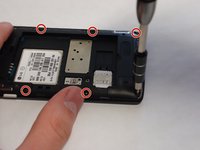
    • Remove eight 4mm screws using a Phillips head 000 screwdriver (PH000).

    Спросите у FixBot

    Добавить комментарий

  4. LG Tribute Touchscreen Replacement: шаг 4, изображение 1 из 2 LG Tribute Touchscreen Replacement: шаг 4, изображение 2 из 2
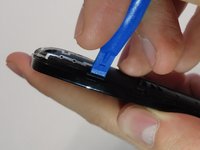
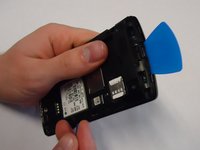
    • Use a plastic opening tool to loosen the tabs around the edge of the phone.

    • Inserting a thin piece of plastic will help prevent opened tabs from locking back into place.

    • This step can be frustrating, but requires patience. Avoid the temptation to pry the panel loose. Using excessive force may break the delicate tabs.

    Спросите у FixBot

    Добавить комментарий

  5. LG Tribute Touchscreen Replacement, Motherboard: шаг 5, изображение 1 из 1
    • Use a plastic opening tool to disconnect the touchscreen from the motherboard.

    • The motherboard will be completely free from the front panel after this step.

    Спросите у FixBot

    Добавить комментарий

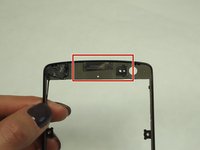
  6. LG Tribute Touchscreen Replacement, Touchscreen: шаг 6, изображение 1 из 3 LG Tribute Touchscreen Replacement, Touchscreen: шаг 6, изображение 2 из 3 LG Tribute Touchscreen Replacement, Touchscreen: шаг 6, изображение 3 из 3
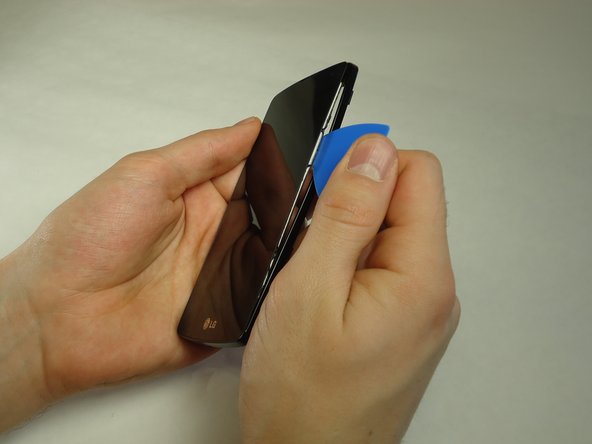
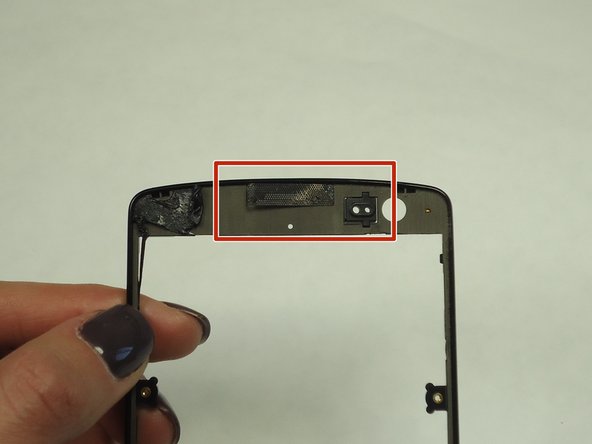
    • Use a thin piece of plastic to carefully peel the frame away from the touchscreen glass.

    • When the frame is completely free, remove all of the glue.

    • When removing the glue, be sure the speaker grill and LED light spacer do not dislodge.

    Спросите у FixBot

    Добавить комментарий

Заключение

To reassemble your device, follow these instructions in reverse order.

Отменить: Я не выполнил это руководство.

12 человек успешно провели ремонт по этому руководству.

Aaron Amdall

Участник с: 01/25/16

940 Репутация

Автор 4 руководств

Команда

University of Wisconsin Stout, Team 1-1, Schneider-Bateman Spring 2016 Участник University of Wisconsin Stout, Team 1-1, Schneider-Bateman Spring 2016

UWSTOUT-SCHNEIDER-BATEMAN-S16S1G1

3 членов

Автор 16 руководств

4 Комментарии к руководству

thank you for all ypu work at web site

salah dholman - Ответить Поделиться

Can you peel away lens without taking apart ?

mikeknapik1 - Ответить Поделиться

Must I remove the motherboard to replace the front cover with the glass?

Deb Schell - Ответить Поделиться

I messed up the speaker is there a way to replace or fix it

bigestbabybratt - Ответить Поделиться

Добавить комментарий

Статистика просмотров:

За последние 24 часов: 1

За последние 7 дней: 7

За последние 30 дней: 43

За всё время: 16,505