Перейти к основному содержанию
Присоединяйся к сообществу ремонтников - Создай аккаунт

Lens Replacement

Выберете то, что вам нужно

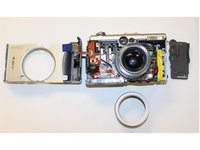
  1. Lens Replacement, Lens: шаг 1, изображение 1 из 3 Lens Replacement, Lens: шаг 1, изображение 2 из 3 Lens Replacement, Lens: шаг 1, изображение 3 из 3
    • Step 1. Remove: Remove the indicated screws from the camera.

    Спросите у FixBot

    Добавить комментарий

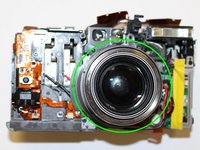
  2. Lens Replacement: шаг 2, изображение 1 из 3 Lens Replacement: шаг 2, изображение 2 из 3 Lens Replacement: шаг 2, изображение 3 из 3
    • Step 2. Remove all the screws: Keep all the screws and disconnect the cables carefully.

    • Step 3. Lift: After removing all the cables, lift up and flip over the PCB.

    Спросите у FixBot

    Добавить комментарий

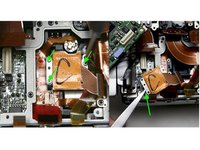
  3. Lens Replacement: шаг 3, изображение 1 из 2 Lens Replacement: шаг 3, изображение 2 из 2
    • Step 4. Remove: Remove marked screws on top and around the lent.

    • **Remove all the parts, be aware that there are a lot of screws and keep count them a long the way of the dissambley **

    Спросите у FixBot

    Добавить комментарий

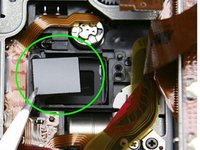
  4. Lens Replacement: шаг 4, изображение 1 из 2 Lens Replacement: шаг 4, изображение 2 из 2
    • Step 5. Carefully remove as much of the glue as possible before proceeding to the next step.

    • Step 6. Remove the marked focus spacers.

    • Place a bead of silicone adhesive on each side of the ir filter to fix it in position and allow to cure.

    Спросите у FixBot

    Добавить комментарий

Заключение

To reassemble your device, follow these instructions in reverse order.

Отменить: Я не выполнил это руководство.

Marina Bayardo

Участник с: 10/22/15

251 Репутация

Автор 2 руководств

Команда

University of Memphis, Team 3-2, Kim Fall 2015 Участник University of Memphis, Team 3-2, Kim Fall 2015

UM-KIM-F15S3G2

4 членов

Автор 6 руководств

0 Комментарии к руководству

Добавить комментарий

Статистика просмотров:

За последние 24 часов: 0

За последние 7 дней: 5

За последние 30 дней: 44

За всё время: 1,869