Перейти к основному содержанию
Присоединяйся к сообществу ремонтников - Создай аккаунт

Levoit Core 300-RAC Motor Replacement

Выберете то, что вам нужно

  1. Levoit Core 300-RAC Motor Replacement, Air Filter: шаг 1, изображение 1 из 2 Levoit Core 300-RAC Motor Replacement, Air Filter: шаг 1, изображение 2 из 2
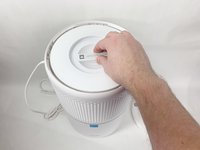
    • Make sure your device is turned off and unplugged for safety.

    • Turn the Levoit Core 300-RAC over so the bottom is facing up.

    Спросите у FixBot

    Добавить комментарий

  2. Levoit Core 300-RAC Motor Replacement: шаг 2, изображение 1 из 3 Levoit Core 300-RAC Motor Replacement: шаг 2, изображение 2 из 3 Levoit Core 300-RAC Motor Replacement: шаг 2, изображение 3 из 3
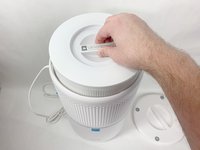
    • Turn the bottom cover counterclockwise and lift it off to remove it.

    • The cover does not "snap" on or off when turned.

    Спросите у FixBot

    Добавить комментарий

  3. Levoit Core 300-RAC Motor Replacement: шаг 3, изображение 1 из 3 Levoit Core 300-RAC Motor Replacement: шаг 3, изображение 2 из 3 Levoit Core 300-RAC Motor Replacement: шаг 3, изображение 3 из 3
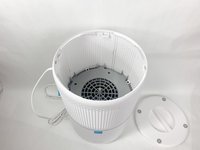
    • Lift the filter straight up and out of the device.

    Спросите у FixBot

    Добавить комментарий

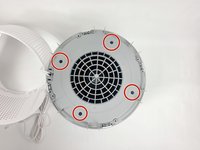
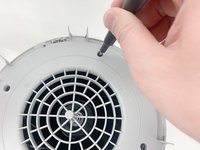
  4. Levoit Core 300-RAC Motor Replacement, Power Board: шаг 4, изображение 1 из 3 Levoit Core 300-RAC Motor Replacement, Power Board: шаг 4, изображение 2 из 3 Levoit Core 300-RAC Motor Replacement, Power Board: шаг 4, изображение 3 из 3
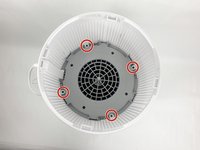
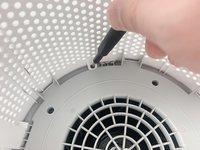
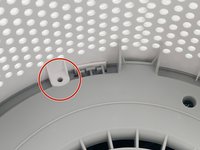
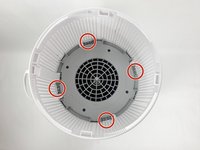
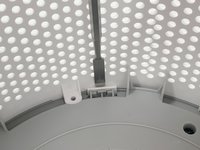
    • Use a Phillips #2 screwdriver to remove the four screws that secure the gray lid towards the base of the device.

    • Set the screws aside in a safe place.

    Спросите у FixBot

    Добавить комментарий

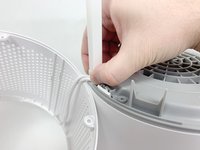
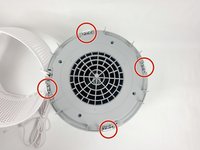
  5. Levoit Core 300-RAC Motor Replacement: шаг 5, изображение 1 из 3 Levoit Core 300-RAC Motor Replacement: шаг 5, изображение 2 из 3 Levoit Core 300-RAC Motor Replacement: шаг 5, изображение 3 из 3
    • Use a metal spudger or Jimmy to gently pry between the four white tabs and the white housing to release the outer housing.

    • Gently pulling up on the outer housing can prevent the clips from resetting.

    Спросите у FixBot

    Добавить комментарий

  6. Levoit Core 300-RAC Motor Replacement: шаг 6, изображение 1 из 2 Levoit Core 300-RAC Motor Replacement: шаг 6, изображение 2 из 2
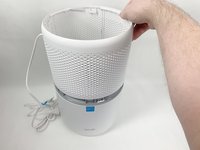
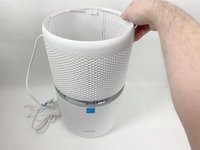
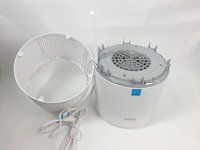
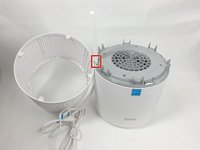
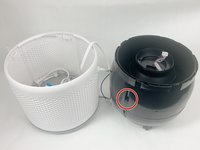
    • Remove the white outer housing and set it to the side.

    • The power cord is fed through a hole in the side of this housing, so it has to sit right next to the device.

    Спросите у FixBot

    Добавить комментарий

  7. Levoit Core 300-RAC Motor Replacement: шаг 7, изображение 1 из 3 Levoit Core 300-RAC Motor Replacement: шаг 7, изображение 2 из 3 Levoit Core 300-RAC Motor Replacement: шаг 7, изображение 3 из 3
    • Grab the cable channel by its base, squeeze, and pull up at the same time to remove it.

    Спросите у FixBot

    Добавить комментарий

  8. Levoit Core 300-RAC Motor Replacement: шаг 8, изображение 1 из 2 Levoit Core 300-RAC Motor Replacement: шаг 8, изображение 2 из 2
    • Remove the four Phillips #2 screws securing the gray face plate.

    • Set the screws aside in a safe place.

    Спросите у FixBot

    Добавить комментарий

  9. Levoit Core 300-RAC Motor Replacement: шаг 9, изображение 1 из 3 Levoit Core 300-RAC Motor Replacement: шаг 9, изображение 2 из 3 Levoit Core 300-RAC Motor Replacement: шаг 9, изображение 3 из 3
    • Insert a Jimmy or spudger between the white tab and the gray faceplate body to release the faceplate.

    • Lift it out.

    Спросите у FixBot

    Добавить комментарий

  10. Levoit Core 300-RAC Motor Replacement: шаг 10, изображение 1 из 1
    • Turn your device over so it is upright again.

    Спросите у FixBot

    Добавить комментарий

  11. Levoit Core 300-RAC Motor Replacement: шаг 11, изображение 1 из 3 Levoit Core 300-RAC Motor Replacement: шаг 11, изображение 2 из 3 Levoit Core 300-RAC Motor Replacement: шаг 11, изображение 3 из 3
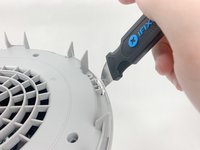
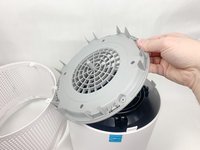
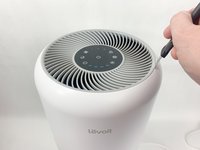
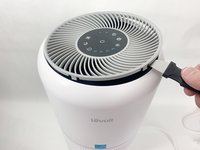
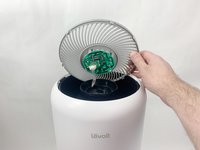
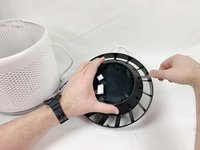
    • Insert the Jimmy between the gray grille cover and the top of the device.

    • Work your way around the grille cover with the Jimmy to release the clips holding it in place.

    • Take note of the placement of the clips, as they are keyed and need to go back in the exact way they came out.

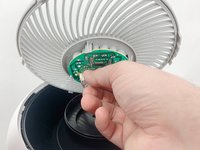
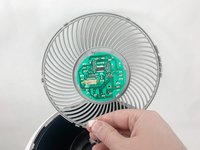
    • Remove the grille cover gently as it is connected by a ribbon cable.

    • Be careful not to put too much strain on the ribbon cable as it may break.

    Спросите у FixBot

    Добавить комментарий

  12. Levoit Core 300-RAC Motor Replacement: шаг 12, изображение 1 из 3 Levoit Core 300-RAC Motor Replacement: шаг 12, изображение 2 из 3 Levoit Core 300-RAC Motor Replacement: шаг 12, изображение 3 из 3
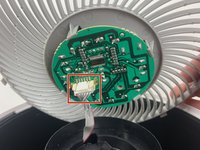
    • Squeeze the tab on the connector to release the bundled cable from the control board.

    • The connector should come out fairly easily, so do not force it. Pulling too hard could damage the connector.

    Спросите у FixBot

    Добавить комментарий

  13. Levoit Core 300-RAC Motor Replacement: шаг 13, изображение 1 из 3 Levoit Core 300-RAC Motor Replacement: шаг 13, изображение 2 из 3 Levoit Core 300-RAC Motor Replacement: шаг 13, изображение 3 из 3
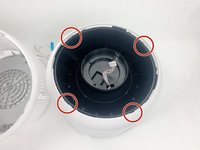
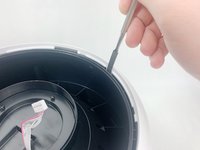
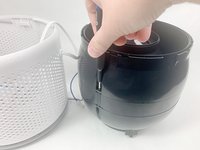
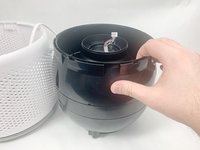
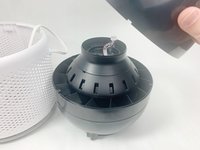
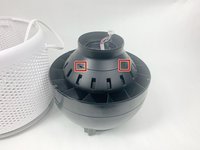
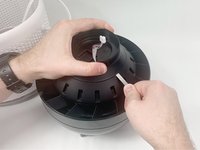
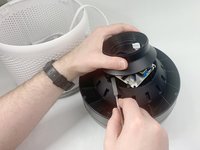
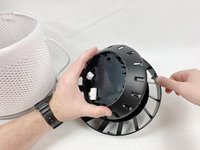
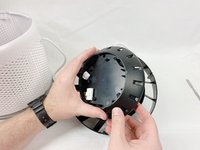
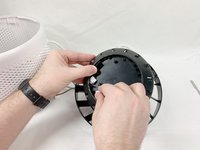
    • Insert a spudger or Jimmy into the four tabs to release them from holding the outer white housing to the inner black core.

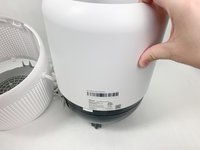
    • Remove the white outer housing.

    Спросите у FixBot

    Добавить комментарий

  14. Levoit Core 300-RAC Motor Replacement: шаг 14, изображение 1 из 2 Levoit Core 300-RAC Motor Replacement: шаг 14, изображение 2 из 2
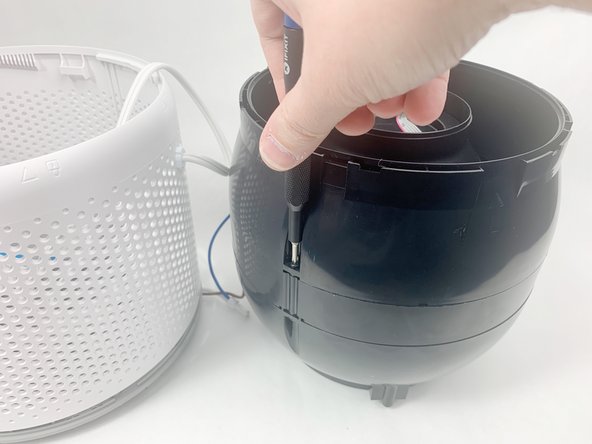
    • Use a Phillips #2 screwdriver to remove the three screws holding the top of the black center section to the middle section.

    Спросите у FixBot

    Добавить комментарий

  15. Levoit Core 300-RAC Motor Replacement: шаг 15, изображение 1 из 3 Levoit Core 300-RAC Motor Replacement: шаг 15, изображение 2 из 3 Levoit Core 300-RAC Motor Replacement: шаг 15, изображение 3 из 3
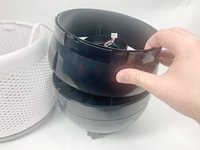
    • Lift and remove the upper portion of the black core.

    Спросите у FixBot

    Добавить комментарий

  16. Levoit Core 300-RAC Motor Replacement: шаг 16, изображение 1 из 3 Levoit Core 300-RAC Motor Replacement: шаг 16, изображение 2 из 3 Levoit Core 300-RAC Motor Replacement: шаг 16, изображение 3 из 3
    • Insert a spudger into the slots around the seam to gently pry the upper part off of the assembly.

    Спросите у FixBot

    Добавить комментарий

  17. Levoit Core 300-RAC Motor Replacement: шаг 17, изображение 1 из 2 Levoit Core 300-RAC Motor Replacement: шаг 17, изображение 2 из 2
    • Feed the ribbon connector through the space in the top part of the assembly before removing it.

    • Carefully pass the connector through the hole so you do not damage it.

    Спросите у FixBot

    Добавить комментарий

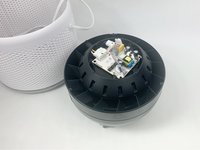
  18. Levoit Core 300-RAC Motor Replacement: шаг 18, изображение 1 из 3 Levoit Core 300-RAC Motor Replacement: шаг 18, изображение 2 из 3 Levoit Core 300-RAC Motor Replacement: шаг 18, изображение 3 из 3
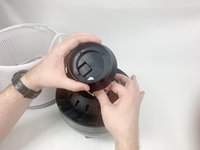
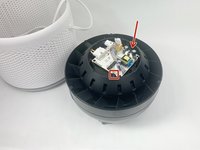
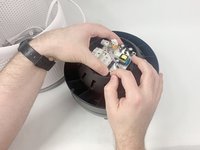
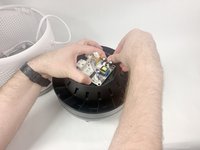
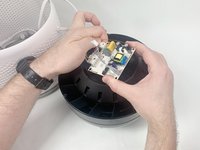
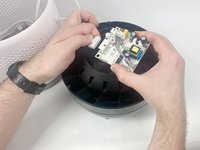
    • Use your hands to pry apart the two tabs on opposite sides of the power board.

    • Use one hand to push on the tabs while gently lifting with your other hand to keep them from resetting.

    • There is a third tab that the board will slide out from under when the other two are released.

    • After releasing the two tabs shown, the power board will be free. Do not pull hard on the attached cables as that can damage them as well as other parts.

    Спросите у FixBot

    Добавить комментарий

  19. Levoit Core 300-RAC Motor Replacement: шаг 19, изображение 1 из 3 Levoit Core 300-RAC Motor Replacement: шаг 19, изображение 2 из 3 Levoit Core 300-RAC Motor Replacement: шаг 19, изображение 3 из 3
    • Squeeze down on the clips holding the connectors in place to release the cables.

    • The power board is now completely removed.

    Спросите у FixBot

    Добавить комментарий

  20. Levoit Core 300-RAC Motor Replacement, Motor: шаг 20, изображение 1 из 1
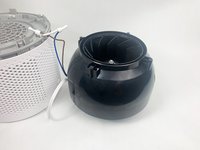
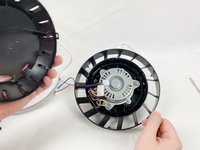
    • Turn the device over so that the fan is pointing up.

    Спросите у FixBot

    Добавить комментарий

  21. Levoit Core 300-RAC Motor Replacement: шаг 21, изображение 1 из 1
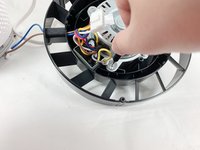
    • Use wire cutters to carefully cut off the crimped power cord connection.

    • Cut as close to the connection as possible to leave the most power cord available for reassembly.

    Спросите у FixBot

    Добавить комментарий

  22. Levoit Core 300-RAC Motor Replacement: шаг 22, изображение 1 из 1
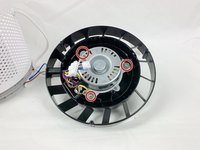
    • Use a Phillips #2 screwdriver to remove the three screws located around the fan cover.

    Спросите у FixBot

    Добавить комментарий

  23. Levoit Core 300-RAC Motor Replacement: шаг 23, изображение 1 из 3 Levoit Core 300-RAC Motor Replacement: шаг 23, изображение 2 из 3 Levoit Core 300-RAC Motor Replacement: шаг 23, изображение 3 из 3
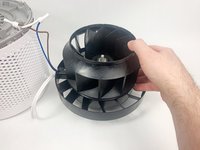
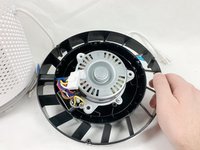
    • Lift the fan cover straight up to remove it.

    Спросите у FixBot

    Добавить комментарий

  24. Levoit Core 300-RAC Motor Replacement: шаг 24, изображение 1 из 3 Levoit Core 300-RAC Motor Replacement: шаг 24, изображение 2 из 3 Levoit Core 300-RAC Motor Replacement: шаг 24, изображение 3 из 3
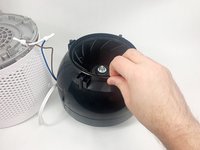
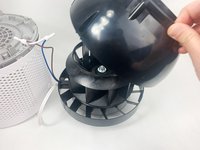
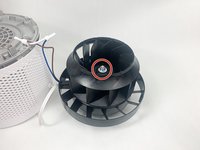
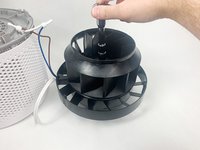
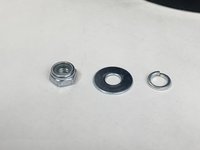
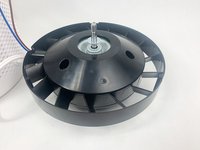
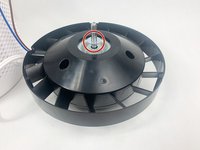
    • Use a 13 mm socket wrench with an extension to remove the nut holding the fan in place. Remove all hardware from the threaded shaft.

    • There should be a nylon-insert lock nut, a flat washer, and a split ring washer. Set these aside in a safe location.

    Спросите у FixBot

    Добавить комментарий

  25. Levoit Core 300-RAC Motor Replacement: шаг 25, изображение 1 из 3 Levoit Core 300-RAC Motor Replacement: шаг 25, изображение 2 из 3 Levoit Core 300-RAC Motor Replacement: шаг 25, изображение 3 из 3
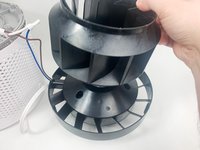
    • Lift the fan up and off of the threaded shaft.

    Спросите у FixBot

    Добавить комментарий

  26. Levoit Core 300-RAC Motor Replacement: шаг 26, изображение 1 из 3 Levoit Core 300-RAC Motor Replacement: шаг 26, изображение 2 из 3 Levoit Core 300-RAC Motor Replacement: шаг 26, изображение 3 из 3
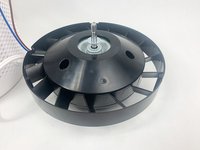
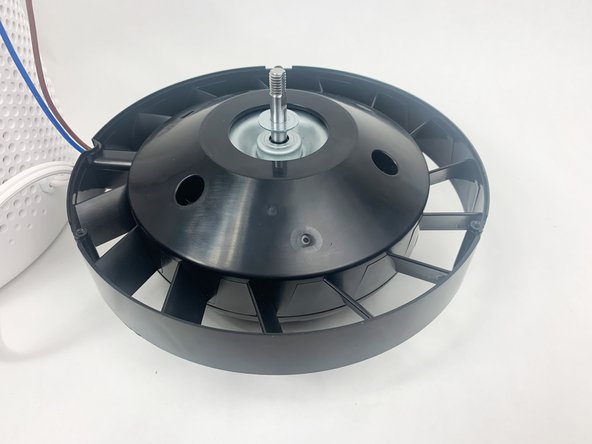
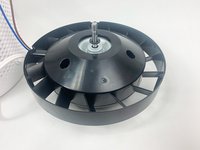
    • Remove the remaining washer that was underneath the fan.

    Спросите у FixBot

    Добавить комментарий

  27. Levoit Core 300-RAC Motor Replacement: шаг 27, изображение 1 из 1
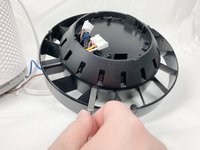
    • Turn the motor assembly over.

    • It will not lay flat.

    Спросите у FixBot

    Добавить комментарий

  28. Levoit Core 300-RAC Motor Replacement: шаг 28, изображение 1 из 3 Levoit Core 300-RAC Motor Replacement: шаг 28, изображение 2 из 3 Levoit Core 300-RAC Motor Replacement: шаг 28, изображение 3 из 3
    • Pry apart the motor housing using a spudger inserted into the notches around the seam.

    • Breaking one or more of the internal tabs holding the housing together may be unavoidable.

    Спросите у FixBot

    Добавить комментарий

  29. Levoit Core 300-RAC Motor Replacement: шаг 29, изображение 1 из 3 Levoit Core 300-RAC Motor Replacement: шаг 29, изображение 2 из 3 Levoit Core 300-RAC Motor Replacement: шаг 29, изображение 3 из 3
    • Lift off the free portion of the motor housing.

    • The cables that connected to the power board may get caught on the holes in this piece.

    Спросите у FixBot

    Добавить комментарий

  30. Levoit Core 300-RAC Motor Replacement: шаг 30, изображение 1 из 3 Levoit Core 300-RAC Motor Replacement: шаг 30, изображение 2 из 3 Levoit Core 300-RAC Motor Replacement: шаг 30, изображение 3 из 3
    • Use a Phillips #2 screwdriver to remove the three flange screws holding the motor in place.

    Спросите у FixBot

    Добавить комментарий

  31. Levoit Core 300-RAC Motor Replacement: шаг 31, изображение 1 из 3 Levoit Core 300-RAC Motor Replacement: шаг 31, изображение 2 из 3 Levoit Core 300-RAC Motor Replacement: шаг 31, изображение 3 из 3
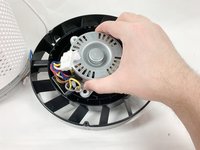
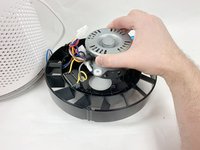
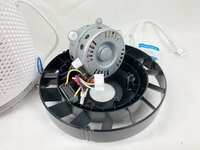
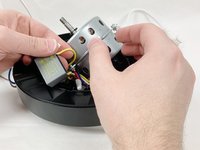
    • Lift the motor out of the housing and set it down on its side.

    • There are still wires holding the motor in place.

    • The remaining piece of the motor housing should rest flat now.

    Спросите у FixBot

    Добавить комментарий

  32. Levoit Core 300-RAC Motor Replacement: шаг 32, изображение 1 из 3 Levoit Core 300-RAC Motor Replacement: шаг 32, изображение 2 из 3 Levoit Core 300-RAC Motor Replacement: шаг 32, изображение 3 из 3
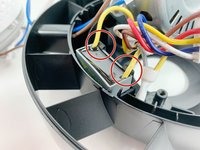
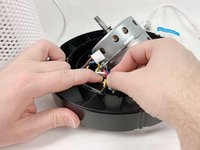
    • Use your hands to unclip the capacitor in the motor housing.

    Спросите у FixBot

    Добавить комментарий

  33. Levoit Core 300-RAC Motor Replacement: шаг 33, изображение 1 из 1
    • Remove the motor completely from the motor housing.

    Спросите у FixBot

    Добавить комментарий

Заключение

To reassemble your device, follow these instructions in reverse order. You may use solder and heat shrink tubing, or wire nuts to reconnect the power cable.

Отменить: Я не выполнил это руководство.

2 человек успешно провели ремонт по этому руководству.

David Kamp

Участник с: 11/02/23

589 Репутация

Автор 3 руководств

Команда

UMass Dartmouth, Team 1-6, Petersen Fall 2023 Участник UMass Dartmouth, Team 1-6, Petersen Fall 2023

UMASSD-PETERSEN-F23S1G6

5 членов

Автор 8 руководств

5 Комментарии к руководству

Thanks for a comprehensive teardown, and here because I'm thinking of making a new control board for the Leovit. One thing, the article seems to fall short on one crucial point though, given that it's about replacing the motor, and that's where to get a replacement and details about the motor itself. Being pedantic, it also doesn't actually describe how to replace the motor, only how to get to the stage of being able to replace it.

Nick - Ответить Поделиться
Yes, where can we order the new motor?

Namrebod - Ответить Поделиться

Hello, thanks for the instructions, do you have a photo of the production label of the fan please? I can't read it. Thank you. John

Jan Nedbal - Ответить Поделиться
Thank you for your instructions. Our Levoit 300 is making a high pitched sound. I've read on other sites to grease the bearings. Could you please explain how I can find the bearings and what they look like?

Thank you

Alaskan Grown - Ответить Поделиться
I have same question. I have a high-pitched sound coming out of it and have read that I should lubricate the motor. Is there a way to do that without doing this complete teardown? And how and where do I do it?

Karin B - Ответить Поделиться

Добавить комментарий

Статистика просмотров:

За последние 24 часов: 5

За последние 7 дней: 36

За последние 30 дней: 130

За всё время: 3,937