Введение
Снятие нижней панели РУД (рычага управления двигателем) Logitech G X56 HOTAS — необходимый шаг для доступа к внутренним компонентам, таким как светодиодные индикаторы, тумблеры или механические детали, отвечающие за движение рычагов. Если вы столкнулись с неисправностью светодиодов, отсутствием реакции переключателей или физическим сопротивлением при перемещении РУД, разборка нижней панели позволит осмотреть, обслужить или заменить поврежденные детали. В этом руководстве подробно описан процесс безопасного снятия нижней панели, который поможет избежать повреждения проводки и внутренних разъемов.
Выберете то, что вам нужно
-
-
-
-
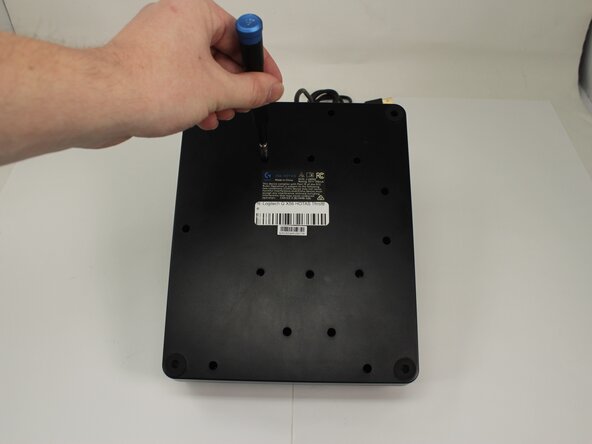
Открутите пятнадцать винтов Phillips #1 длиной 13,6 мм, которыми нижняя панель крепится к основанию корпуса.
-

 Спросите у FixBot



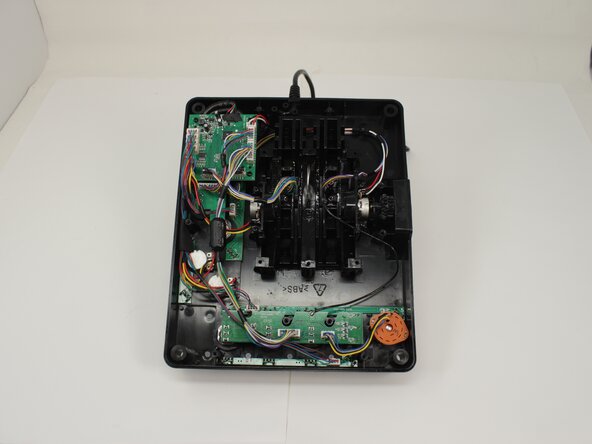
Для сборки устройства выполните эти действия в обратном порядке.
Отменить: Я не выполнил это руководство.
Еще один человек закончил это руководство.
Особая благодарность этим переводчикам:
100%

Translation Bot помогает нам починить мир! Хотите внести свой вклад?
Начните переводить ›

Команда

University of Memphis, Team 3-5, Sneed Spring 2025 Участник University of Memphis, Team 3-5, Sneed Spring 2025
UM-SNEED-S25S3G5
4 членов
Автор 77 руководств
